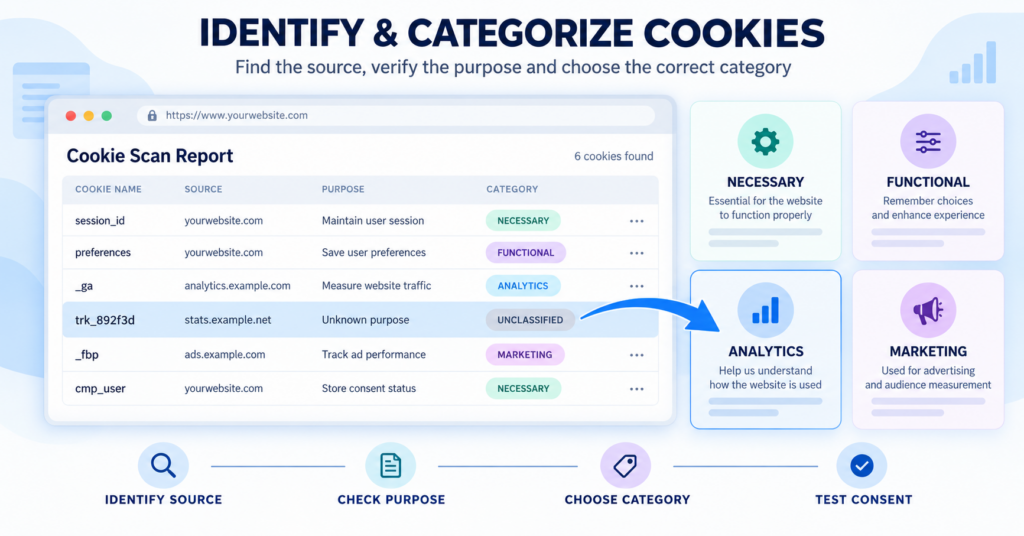
Most cookie consent platforms can automatically identify and categorize many of the cookies found during a website scan. However, automatic results are not always complete. New, customized or dynamically named cookies may remain unclassified, and some automatically assigned categories may still require verification.
This guide explains how to investigate an unknown cookie, identify the service that created it and choose a category based on its actual purpose. It also shows where to find reliable cookie information, how to use public cookie databases and what to test after updating your consent management platform.
Start by recording the cookie’s name, domain, duration, and the action that created it. Identify the responsible service and check its official documentation before consulting a public cookie database. Choose the category according to the cookie’s actual purpose. If the purpose cannot be confirmed, leave the cookie unclassified temporarily and continue investigating instead of guessing.
What Does Cookie Categorization Mean?
Cookie categorization means assigning a cookie to a group based on why it is used. Common groups include Necessary, Functional, Analytics, and Marketing cookies.
Different consent management platforms may use different names for the same category. For example, analytics cookies may be called Performance or Statistics cookies. Marketing cookies may be called Advertising or Targeting cookies.
It is helpful to separate the complete process into five different tasks:
- Detection finds the cookie on the website.
- Identification determines which service or feature created it.
- Categorization assigns a category based on its purpose.
- Consent control determines when the cookie or its source script may run.
- Documentation explains the cookie to visitors in the banner or cookie policy.
A cookie scanner may successfully detect a cookie without knowing its purpose. Similarly, adding a description to a cookie report does not automatically guarantee that the script creating the cookie is correctly blocked.
If you are still learning how scanners work, read our guide to what a cookie scanner does.
Why Are Many Cookies Categorized Automatically?
Modern consent management platforms often maintain databases of commonly used cookies. When a scanner finds a cookie, it can compare the name, domain, and known naming pattern with entries in its database.
This allows the platform to automatically provide information such as:
- the service or provider responsible for the cookie;
- the cookie’s likely purpose;
- its suggested category;
- a visitor-friendly description;
- its usual expiration period.
For example, a scanner may recognize Google Analytics cookies beginning with _ga, common consent cookies, ecommerce session cookies, and cookies created by popular video or advertising services.
The amount of automatic coverage depends on the platform and the website. As one example, CookieScript states that its database contains more than 100,000 commonly used cookies and covers approximately 80% of detected website cookies on average. This is a provider estimate rather than a result that applies to every scanner or website.
You can read more about this example on the CookieScript Cookie Scanner page.
An automatically selected category is a useful starting point. It should still be checked when the cookie is important, unfamiliar, assigned to an unexpected category, or connected to analytics, advertising, embedded media, or user profiling.
Why Do Some Cookies Remain Unclassified?
An unclassified or unknown cookie is a cookie that the scanner detected but could not confidently match with a known purpose and category.
A cookie may remain unclassified because:
- it is new and has not yet been added to the scanner’s database;
- it belongs to a small or less common service;
- it was created specifically for your website;
- its name contains a random or website-specific identifier;
- the same cookie name can be used for different purposes;
- it appears only after logging in or completing another action;
- the scanner did not visit the page that creates it;
- the provider has not published a clear explanation;
- the technology uses Local Storage or Session Storage instead of a traditional cookie.
An unclassified result does not necessarily mean the cookie is dangerous. It means its purpose has not yet been confirmed.
What Happens If a Cookie Is Left Unclassified?
Leaving a cookie unclassified temporarily is better than assigning an unsupported category. However, it should not be ignored indefinitely.
Depending on the consent management platform and its blocking configuration, an unclassified cookie can cause several problems:
- the cookie declaration may display it as Unclassified or Unknown;
- the visitor may not receive a useful explanation of its purpose;
- the platform may not know which consent category should control it;
- the cookie or its source script may remain blocked when it is needed;
- the script may be allowed under an inappropriate category;
- the website’s cookie documentation may remain incomplete.
The label Unclassified does not by itself prove that a website is non-compliant. It indicates that the website owner has not yet confirmed the cookie’s purpose and should investigate it.
Changing or deleting an entry in a cookie report does not necessarily stop the real cookie from being created. To control the cookie, you may also need to configure or block the plugin, tag, embed, or third-party script responsible for it.
Step 1 – Record the Cookie Details
Begin by collecting the information already available in your scanner, consent platform, or browser developer tools.
Record the following details:
- cookie name;
- domain;
- path;
- expiration period;
- whether it is first-party or third-party;
- the page where it appeared;
- the action completed before it appeared;
- any existing provider or purpose description.
The domain can provide an important clue. A cookie connected to a domain such as youtube.com probably comes from an embedded YouTube feature. A cookie using your own domain may come from your content management system, a first-party script, or a third-party service operating through your domain.
A first-party cookie is not automatically Strictly Necessary. Analytics and advertising tools can also create first-party cookies. Similarly, a third-party cookie is not automatically a Marketing cookie.
Step 2 – Identify Which Service Created the Cookie
Next, connect the cookie to the plugin, script, embed, or website feature that creates it.
Check the technologies used on the relevant page, including:
- analytics platforms;
- advertising and remarketing tags;
- content management system plugins;
- ecommerce and payment features;
- embedded videos and maps;
- live chat and support widgets;
- social media embeds;
- login, security, and fraud prevention services;
- personalization and testing tools;
- Google Tag Manager or another tag management system.
You can temporarily disable a suspected plugin or service on a staging website and repeat the test. If the cookie no longer appears, you have found useful evidence about its source.
A production service should not be removed only for testing unless you understand the possible effect on the website. Use a staging environment where practical.
Step 3 – Check the Provider’s Official Documentation
The service provider’s official documentation is normally the best external source. Search its privacy policy, cookie policy, developer documentation, or support centre for the exact cookie name.
For example, Google publishes information about cookies used by its services on its official cookie technologies page.
When reading provider documentation, look for answers to these questions:
- What service creates the cookie?
- What information does it store or access?
- Why is that information used?
- Does the provider use it for measurement, personalization, or advertising?
- Is it required for a feature requested by the visitor?
- How long does it remain in the browser?
Do not rely only on wording such as “improves the user experience.” That description may be too broad to determine whether the cookie is Functional, Analytics, or Marketing.
Step 4 – Search a Public Cookie Database
If the provider’s documentation does not answer the question, search a public cookie database using the exact cookie name.
Useful research resources include:
- Cookiedatabase.org, which contains information about cookies, Local Storage, pixels, and other tracking technologies;
- CookieSearch, which allows visitors to search for known cookie names and descriptions;
- Cookiepedia, a public cookie information resource operated by OneTrust;
- the cookie database or More information feature included with your consent management platform.
Try searching both the complete cookie name and a shortened name pattern. Some cookies contain an account, property, website, or session identifier that changes between implementations.
For example, Google Analytics can create _ga and cookies beginning with _ga_. A specific cookie may contain a measurement-related suffix, but that suffix will not be the same on every website.
A public cookie database is not final proof of how a cookie is used on your website. Entries can be incomplete, outdated, or based on a different implementation. Compare the result with official provider documentation and the cookie’s actual behavior.
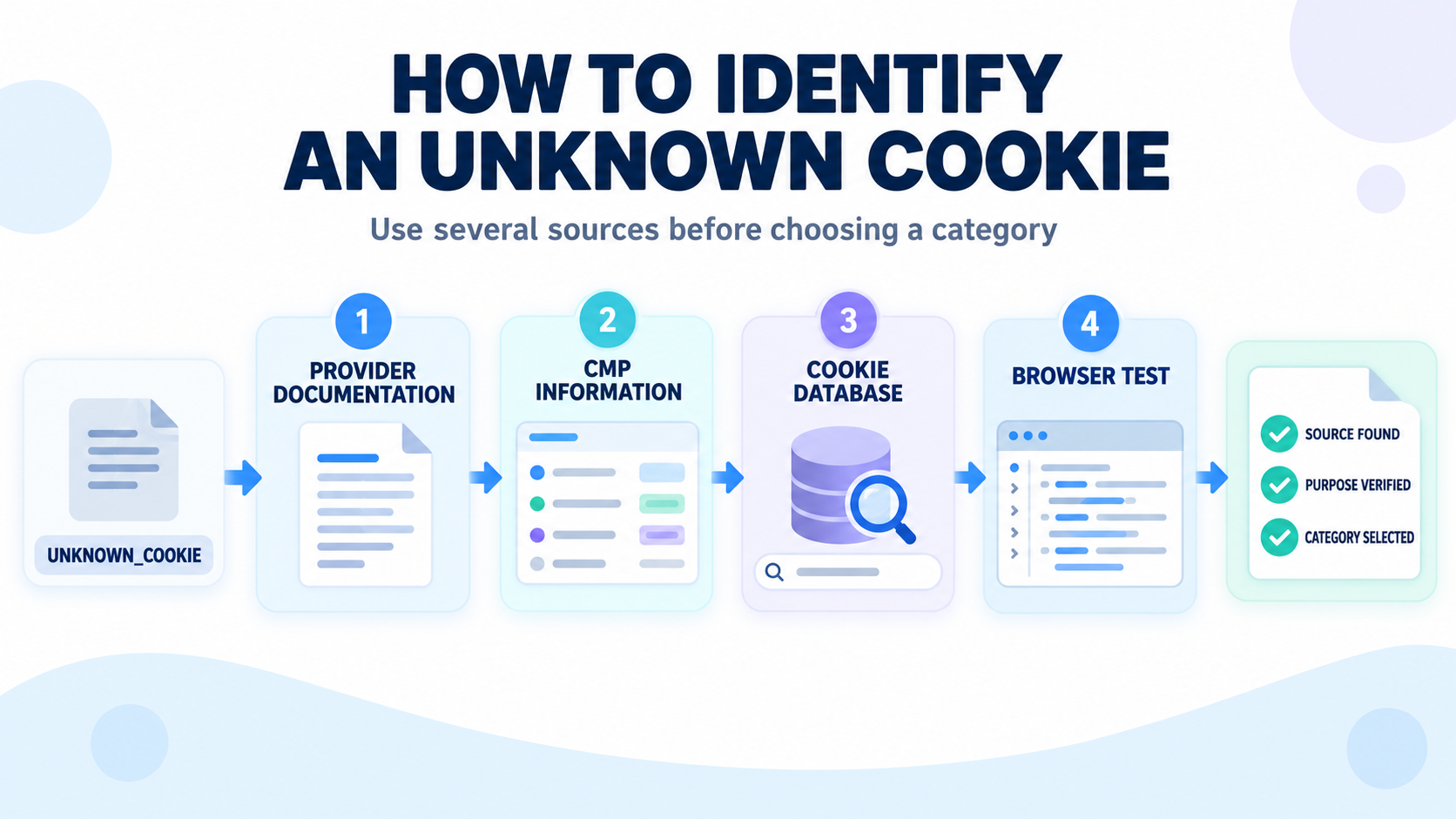
Step 5 – Test When the Cookie Appears
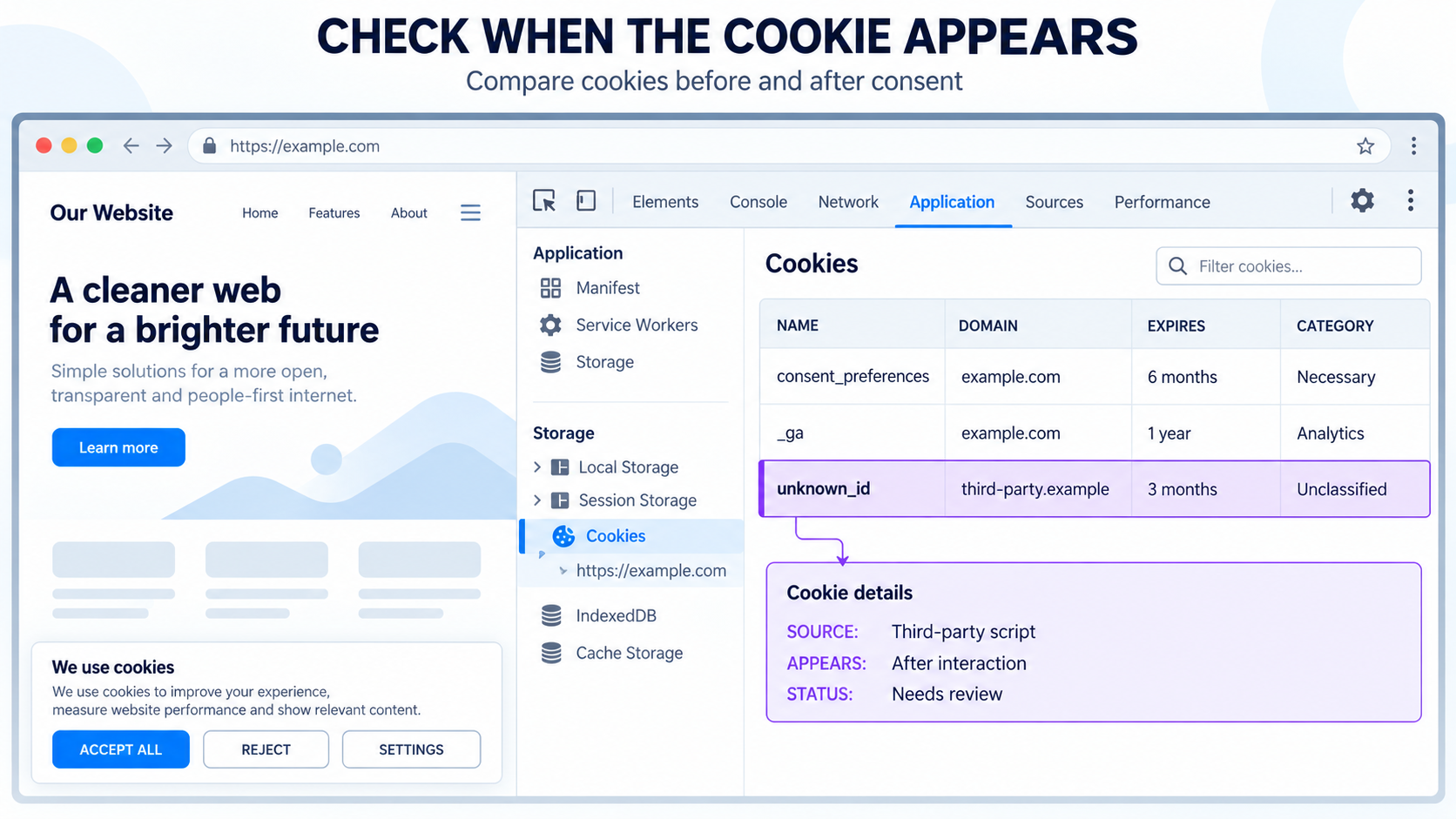
Testing when a cookie appears can reveal which feature and consent category it belongs to.
Open the website in a fresh incognito or private browsing window. Then check the stored cookies at several stages:
- before making any selection on the cookie banner;
- after allowing only necessary cookies;
- after enabling functional cookies;
- after enabling analytics cookies;
- after enabling marketing cookies;
- after interacting with the feature connected to the cookie.
The additional interaction may include playing a video, opening a map, submitting a form, logging in, adding a product to the shopping cart, or opening a chat widget.
In Chrome, open Developer Tools and use the Application tab to inspect cookies and browser storage. The Network tab can help identify the script or request that creates the cookie.
Repeat the test in a fresh private window after each important change. An existing cookie from an earlier session can make the result difficult to interpret.
Step 6 – Choose the Category Based on Purpose
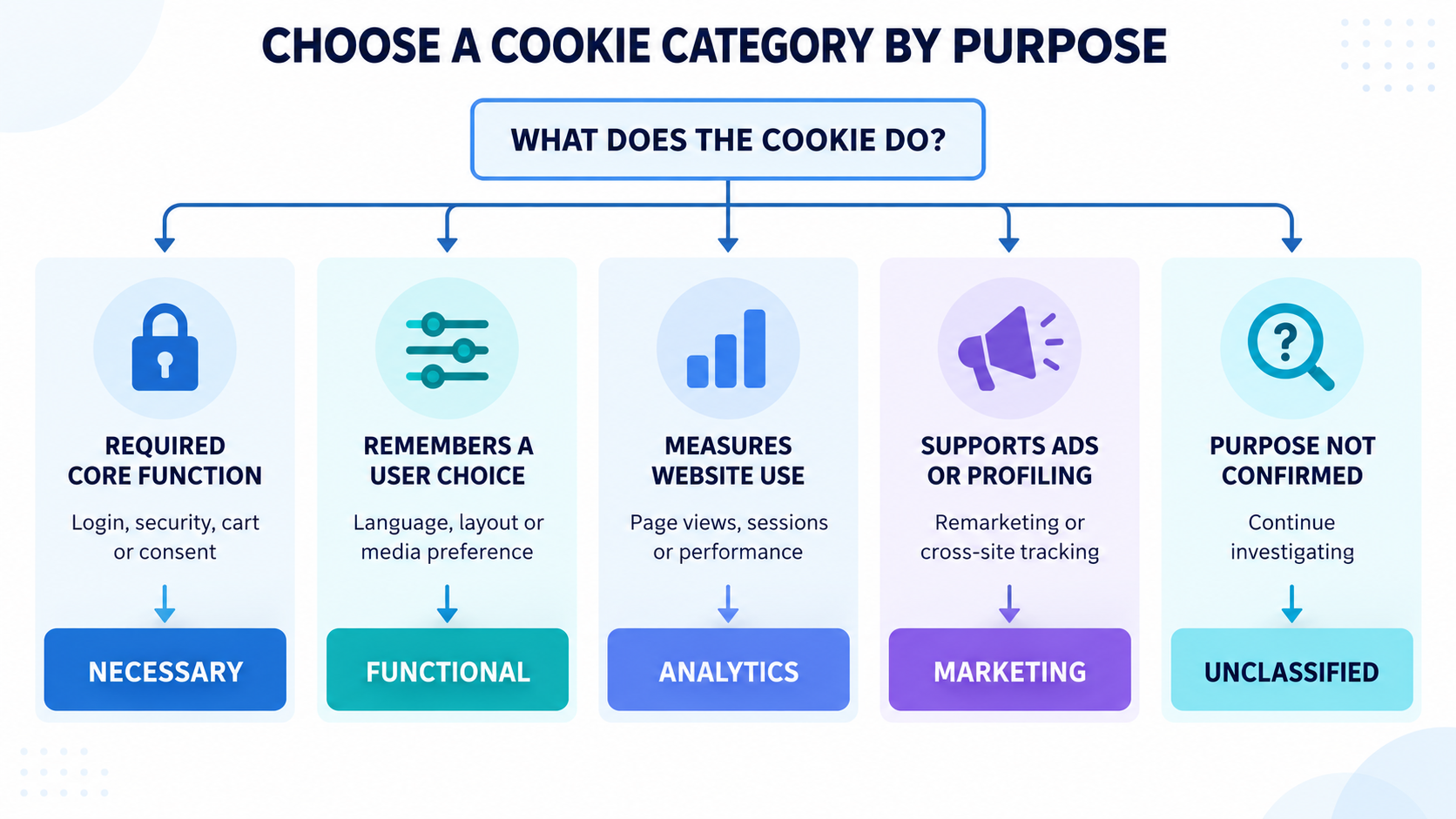
The correct category depends primarily on why the cookie is used. Its name, domain, expiration period, and first-party or third-party status provide supporting information, but they do not determine the category by themselves.
| Common category | Alternative names | Typical purpose | Common examples |
|---|---|---|---|
| Strictly Necessary | Necessary, Essential | Provides a core service or feature requested by the visitor | Consent preferences, security, login sessions, and shopping carts |
| Functionality | Functional, Preferences | Remembers choices or enables optional website features | Language settings, interface preferences, and media features |
| Performance | Analytics, Statistics | Measures website usage, traffic, or performance | Page views, visitor statistics, and analytics services |
| Targeting | Marketing, Advertising | Supports advertising, profiling, or cross-site tracking | Remarketing, advertising platforms, and tracking pixels |
| Unclassified | Unknown | The purpose has not yet been confirmed | New, custom, or insufficiently documented cookies |
These names are not completely standardized between consent platforms. Always compare the category description supplied by your platform with the purpose you identified.
Use This Cookie Category Decision Process
Use the following questions when deciding which category fits the cookie.
Is it required for a service requested by the visitor?
If the website cannot provide a core feature explicitly requested by the visitor without the cookie, it may be Strictly Necessary.
Examples can include storing consent choices, maintaining a secure login session, remembering shopping cart contents, or supporting fraud prevention required for a transaction.
Does it remember a preference or enable an optional feature?
If the cookie remembers a language, layout, video player setting, or another user preference, it may belong to Functionality or Preferences.
Does it measure website use or performance?
If the cookie records page views, sessions, traffic sources, errors, or other usage statistics, it will normally belong to Performance, Analytics, or Statistics.
Analytics can be valuable to the website owner without being essential to the service requested by the visitor.
Does it support advertising or profiling?
If the cookie helps create visitor profiles, select advertisements, measure advertising campaigns, perform remarketing, or track activity across websites, it will normally belong to Targeting, Marketing, or Advertising.
Is the purpose still unclear?
If you cannot support the category with reliable information, leave the cookie Unclassified and continue investigating. Do not move it to Strictly Necessary simply to prevent it from being blocked.
Practical Cookie Categorization Examples
| Example | Likely category | Reason |
|---|---|---|
| Cookie consent preference | Strictly Necessary | Remembers whether the visitor accepted or rejected cookie categories |
| Login session cookie | Strictly Necessary | Keeps an authenticated user securely signed in |
| Shopping cart cookie | Strictly Necessary | Remembers products selected by the visitor |
| Language preference | Functionality | Remembers which language the visitor selected |
_ga or _ga_* |
Performance or Analytics | Commonly connected to Google Analytics measurement |
| Advertising remarketing identifier | Targeting or Marketing | Supports advertising audiences or cross-site tracking |
| Unknown custom cookie | Unclassified | The source and purpose still need to be confirmed |
These examples are general guidance. Confirm how the cookie is actually used on your website before applying the category.
What Does Not Determine a Cookie Category?
Avoid categorizing a cookie from a single technical detail. None of the following proves the cookie’s purpose by itself:
- whether it is first-party or third-party;
- whether it expires at the end of the session;
- whether it remains for several months or years;
- whether it uses your website’s domain;
- whether it comes from a well-known provider;
- whether its name contains words such as
session,analytics, orsecure; - whether a public database lists only one possible category.
Expiration helps describe how long the cookie remains, but duration does not determine whether it is Necessary, Functional, Analytics, or Marketing.
What If a Cookie Has More Than One Purpose?
Some services use the same technology for several purposes. For example, a service may provide visitor statistics while also supporting advertising, personalization, or user profiling.
Do not automatically choose the least restrictive category. Determine how the service is configured and what it does with data from your website.
If the cookie is used for personalized advertising, remarketing, profiling, or cross-site tracking, it should not normally be placed only in an Analytics or Functional category.
When a service supports separate purposes, check whether its scripts, consent signals, or storage items can also be separated. Your consent management provider or the service’s integration documentation may provide specific configuration instructions.
How to Write a Useful Cookie Description
A cookie description should help an ordinary visitor understand what the cookie does. Avoid copying a vague technical sentence that does not explain the purpose.
A useful description normally identifies:
- the service that creates the cookie;
- the main reason the cookie is used;
- the type of information it remembers or measures;
- whether the information supports analytics, preferences, or advertising.
For example, instead of writing “This cookie is used by an external service,” use a more specific description such as:
This cookie is used by the analytics service to distinguish website sessions and measure how visitors use the website.
Only include claims that are supported by the provider documentation or your own verified implementation.
Keep a Record of Your Decision
Maintain a simple cookie register so that the same investigation does not need to be repeated during every audit.
| Field | What to record |
|---|---|
| Cookie name | The complete name or a reusable name pattern |
| Provider | The service, plugin, or organization responsible for it |
| Domain | The domain under which the cookie is stored |
| Purpose | A short explanation of why the cookie is used |
| Category | The selected consent category |
| Duration | How long the cookie normally remains |
| Evidence | The documentation, database, or test used to verify it |
| Review date | The date on which the information was last checked |
This record is particularly useful when a provider changes its cookie names, replaces an older cookie, or introduces a new tracking feature.
Update Your Consent Platform and Test the Result
After confirming the category, update the cookie record in your consent management platform. Add a clear description and save the changes.
Then test the website again:
- open a fresh incognito or private window;
- clear any existing website data if necessary;
- load the website without giving consent;
- check which cookies and storage items appear;
- enable consent categories one at a time;
- confirm that the cookie appears only after the appropriate choice;
- check that the cookie declaration displays the correct information;
- repeat the test on important inner pages.
If the cookie still appears before the required consent, changing its label was not enough. The plugin, tag, embed, or script creating it may need to be connected to your consent platform or blocked separately.
Follow our complete guide to testing a cookie banner for a more detailed consent test.
Run another website scan after changing plugins, analytics tools, advertising tags, embeds, or consent settings. Compare the new report with the previous result to find unexpected changes.
Does the Same Process Apply to Browser Storage?
Websites can store information through Local Storage, Session Storage, pixels, and other technologies in addition to traditional cookies.
The same investigation principles still apply:
- identify the storage item;
- find the service or feature that created it;
- confirm its purpose;
- assign the appropriate category where the platform supports it;
- test whether its use follows the visitor’s consent choice.
Session Storage disappearing when the browser tab closes does not automatically make it Strictly Necessary. Its purpose remains the deciding factor.
Read our comparison of cookies and Local Storage for more information about the technical differences.
How Often Should You Review Cookie Categories?
Cookie usage changes when the website, its plugins, or its connected services are updated. Review the cookie report:
- after installing or removing a plugin;
- after adding an analytics or advertising service;
- after changing Google Tag Manager tags;
- after adding videos, maps, chat widgets, or social embeds;
- after changing the consent platform;
- after a major website update;
- when a new scan finds unknown cookies;
- periodically even when no obvious changes have been made.
Automatic recurring scans can help detect changes, but they do not remove the need to review unfamiliar results.
Common Cookie Categorization Mistakes
Trusting every automatic category
Automatic categorization saves time, but the result can be incomplete or based on a common implementation that differs from your configuration.
Marking every first-party cookie as necessary
First-party describes the relationship between the cookie and the visited domain. It does not explain the cookie’s purpose.
Marking analytics as necessary
Analytics may be important to the website owner, but that does not normally make it essential to the service requested by the visitor.
Choosing a category from the cookie duration
Session and persistent cookies can exist in several categories. Duration describes how long the cookie remains, not why it is used.
Deleting an unknown entry from the report
Deleting the entry may hide it from the declaration without removing the script that creates it. Identify and manage the source instead.
Using a database entry as the only evidence
Public databases are valuable research tools, but their information should be compared with provider documentation and actual website behavior.
Changing the category without testing
A correct label does not guarantee correct blocking. Test the website before and after each consent choice.
Final Thoughts
Automated cookie categorization can complete much of the initial work, but it should be treated as a starting point rather than unquestionable proof.
Pay particular attention to unknown cookies, unexpected categories, analytics tools, advertising services, and third-party embeds. Identify the responsible service, check reliable documentation, use cookie databases as supporting research, and test when the cookie appears.
If you cannot confirm a cookie’s purpose, leave it Unclassified temporarily instead of guessing. Once the category is updated, verify that the actual cookie or storage item follows the visitor’s consent choice.
Recommended Next Step
After reviewing your cookie categories, open the website in a fresh incognito window and confirm that analytics, functional, and marketing cookies remain blocked until the visitor enables the corresponding category.

Frequently Asked Questions
Common questions about this topic
No. Cookie scanners can recognize many common cookies, but custom, new, dynamically named, or insufficiently documented cookies may remain unclassified.
Record its name and domain, identify the responsible service, check official documentation, search a reputable cookie database, and test when it appears. Leave it Unclassified if you still cannot confirm its purpose.
No. Analytics, personalization, and advertising services can also create first-party cookies. The correct category depends on the cookie’s purpose.
No. Third-party cookies may support embedded content, security, payment processing, preferences, analytics, or advertising. Their actual purpose must be checked.
The same cookie name may be used differently by separate services or configurations. Categorize it according to its documented and tested use on your website.
No. They are useful research resources, but entries can be outdated, incomplete, or based on another implementation. Prefer official provider documentation and confirm the behavior on your own website.
Not always. This depends on the consent management platform and how the source script is integrated. The cookie’s plugin, tag, or script may need additional blocking or consent configuration.
Do not delete only the report entry and assume the problem is solved. First identify the source. If the cookie is unnecessary, remove or disable the technology that creates it and then test the website again.
Use the same purpose-based approach. Determine why the stored information is used and assign it to Necessary, Functional, Analytics, or Marketing where your consent platform supports storage categorization.