CookieScript helps website owners manage cookie consent, automate cookie scanning, and meet GDPR and ePrivacy requirements with a range of Free and Premium plans.
But how much does CookieScript cost, and is the Free plan enough for your website?
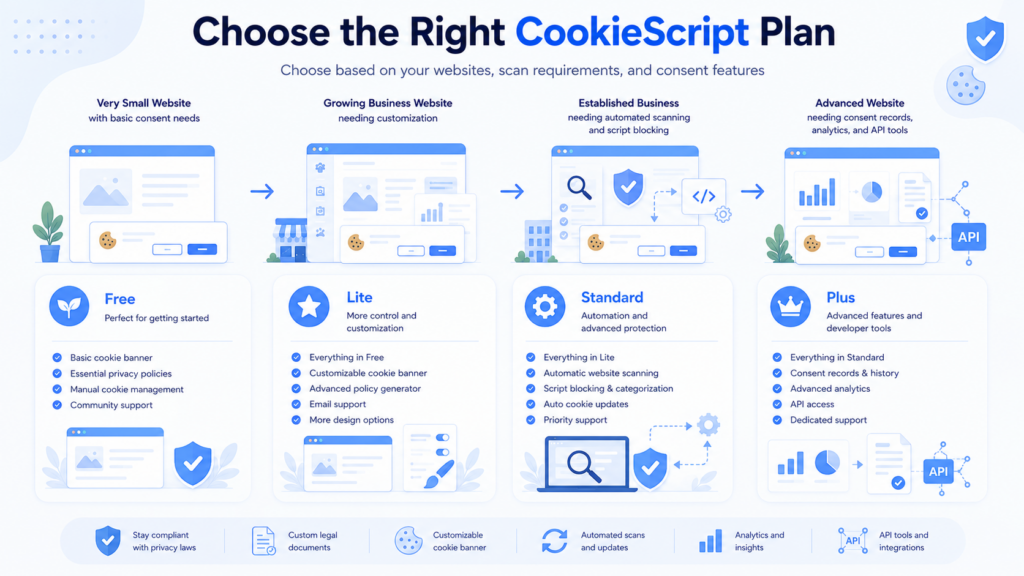
In this guide, we’ll explain CookieScript pricing, compare the Free, Lite, Standard, and Plus plans, and show how domain limits, scanned pages, and included compliance features affect which plan is right for you.
Reviewed by: Cookie compliance specialist
5+ years of hands-on experience with GDPR and consent tools
Tested on real websites using WordPress and custom cookie consent setups
CookieScript pricing depends mainly on the number of domains you manage, the number of pages scanned per domain, and the compliance features included in each plan.
The Free plan is suitable for small websites with basic cookie consent needs. Lite, Standard, and Plus remove the monthly pageview limit, increase scan capacity, and add progressively more automation, reporting, and consent management features.
CookieScript Pricing Plans
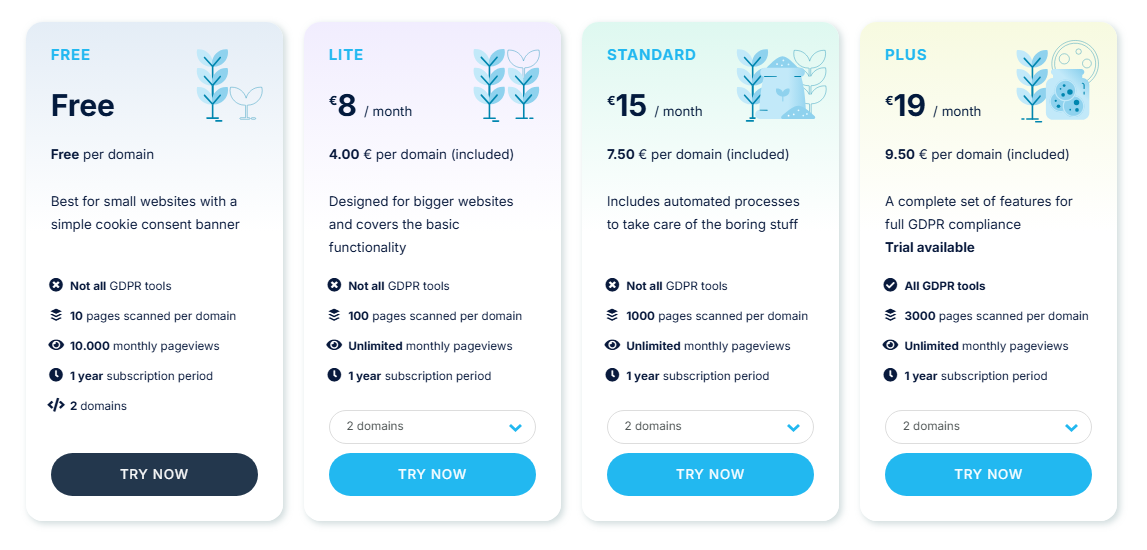
CookieScript offers four main plans: Free, Lite, Standard, and Plus. The paid price changes according to the number of active domains selected in the pricing calculator.
The prices below reflect the two-domain option shown in the CookieScript pricing calculator. All paid plans use a one-year subscription period, although the displayed amount is shown as a monthly equivalent.
| Plan | Price | Scan Limit | Best For |
|---|---|---|---|
| Free | €0 | 10 pages per domain | Small websites needing a simple consent banner |
| Lite | €8/month for 2 domains | 100 pages per domain | Larger websites needing basic paid features |
| Standard | €15/month for 2 domains | 1,000 pages per domain | Businesses needing automated scans and script blocking |
| Plus | €19/month for 2 domains | 3,000 pages per domain | Businesses needing the complete CookieScript feature set |
CookieScript displays monthly prices, but subscriptions are billed annually. The calculator simply converts the annual licence cost into an equivalent monthly amount.
Because CookieScript pricing changes with the number of selected domains, always enter your own domain count and verify the latest prices on the official CookieScript pricing page.
The prices shown here are based on two domains and a one-year subscription period. Your total price may change if you select more domains, use another currency, or need a custom package.
Displayed prices may exclude VAT. CookieScript calculates any applicable VAT during checkout based on the customer’s location and business details.
How Does CookieScript Pricing Work?
CookieScript pricing works around three main factors: the number of active domains, the number of pages scanned per domain, and the features included in the selected plan.
In simple terms, you first choose how many websites need their own CookieScript banner. The pricing calculator then displays the total price for that number of domains.
The second factor is the page scan limit. This controls how many pages CookieScript’s scanner checks on each domain when looking for cookies and tracking technologies.
The third factor is functionality. Lite provides the basic paid features, Standard adds automation, and Plus includes the most advanced consent management, reporting, sharing, and API tools.
Because these three factors work together, two businesses using the same plan may still pay different total amounts if they activate a different number of domains.
| Pricing Factor | What It Means | Why It Matters |
|---|---|---|
| Active domains | The number of websites using an active CookieScript banner | The total paid price changes according to the selected domain count |
| Pages scanned per domain | How many pages the cookie scanner checks on each website | Larger websites may need Standard, Plus, or a custom package |
| Monthly pageviews | How many pages visitors load each month | The Free plan has a limit, while paid plans include unlimited pageviews |
| Automation | Automatic scans and automatic script blocking | These features begin with the Standard plan |
| Advanced consent tools | Consent recording, analytics, IAB TCF, cross-domain consent, and API access | These are mainly included with Plus |
A small website with fewer than ten important pages and modest traffic may be able to use the Free plan.
A larger company website that needs custom colors, geo-targeting, and a higher scan limit may fit Lite.
A business that needs automated monthly scans and script blocking should compare Standard, while websites needing consent records, analytics, or cross-domain tools should consider Plus.
How Does CookieScript Domain-Based Pricing Work?
CookieScript allows you to select a domain range in its pricing calculator. The more active domains you manage, the total subscription price increases, while the effective cost per included domain may decrease.
Only active domains count toward the limit. If you no longer use a banner on a website, you can disable it and use the available domain slot for another site. This means you can reassign unused licences instead of purchasing a new subscription immediately.
Subdomains do not always require separate domain licences. If a subdomain uses the same banner and cookie report as the parent domain, CookieScript can support it under the same setup.
If each subdomain needs a different banner or a separate cookie report, CookieScript treats each one as a separate website.
Count the active websites that need separate cookie banners and cookie reports. Do not automatically count every subdomain as a separate domain if they can share the parent website’s banner configuration.
What Does “Pages Scanned per Domain” Mean?
The page scan limit tells you how many pages CookieScript’s scanner checks on each domain during a cookie scan.
This is not a limit on how many pages your website may contain. Your website can have more pages than the plan’s scan limit, but CookieScript stops scanning additional pages once the limit is reached.
Pages beyond the scan limit continue to work normally—they are simply not included in CookieScript’s automatic cookie scan results until you increase your scan allowance.
For example, the Lite plan scans up to 100 pages per domain. If your website has 250 public pages, the scanner may stop after checking the first 100 pages.
Unused scan capacity cannot be transferred between websites. If one domain uses only part of its allowance, the remaining pages cannot be added to another domain’s limit.
| Plan | Pages Scanned per Domain | Typical Use Case |
|---|---|---|
| Free | 10 pages | Very small websites and landing pages |
| Lite | 100 pages | Small business websites and modest blogs |
| Standard | 1,000 pages | Larger blogs, business websites, and online stores |
| Plus | 3,000 pages | Large ecommerce, publishing, and content websites |
How Can You Check How Many Pages Your Website Has?
The easiest way to estimate how many pages your website has is to open your XML sitemap. If your site uses Yoast SEO, Rank Math, or another SEO plugin, you can usually find it at yourwebsite.com/sitemap_index.xml.
If your website doesn’t have a sitemap index, try yourwebsite.com/sitemap.xml instead. The sitemap may include separate sections for pages, blog posts, products, categories, and other public content, giving you a good estimate of the total number of crawlable pages.
WordPress users can also review the totals shown under Pages, Posts, and Products in the dashboard. However, category archives, landing pages, and other public URLs may increase the number of pages available to the scanner.
The final scan count may differ from your sitemap because CookieScript uses its own scanner. The official scanner result is therefore more reliable than a manual estimate.
Check both your sitemap and the results inside CookieScript before selecting a plan. A website with hundreds of posts or products may need a higher scan limit even if its main navigation contains only a few pages.
What Do You Get With the CookieScript Free Plan?
The CookieScript Free plan is designed for small websites that need a simple cookie consent banner without a paid subscription.
It includes the core banner and blocking tools, but it has a low scan limit and a monthly pageview restriction. It also does not include all of CookieScript’s GDPR and automation features.
- Free use for included domains
- 10 pages scanned per domain
- 10,000 monthly pageviews
- Cookie consent banner
- Cookie blocking based on visitor preferences
- Cookie scanner and cookie declaration
- Google Consent Mode support
- Support for 42 languages
- Free ongoing plan
If you manage a very small website with only a few public pages and fewer than 10,000 monthly pageviews, the CookieScript Free plan may be enough.
If the website grows beyond the scan or pageview limits, Lite is the first paid option to compare.
CookieScript Free vs Lite
Lite removes the Free plan’s monthly pageview restriction and increases the page scan limit substantially.
It also adds useful branding and configuration features, including a privacy policy generator, self-hosted code, geo-targeting, custom colors, and the removal of CookieScript copyrights.
| Feature | Free | Lite |
|---|---|---|
| Price for 2 domains | €0 | €8/month |
| Pages scanned per domain | 10 | 100 |
| Monthly pageviews | 10,000 | Unlimited |
| Google Consent Mode | Included | Included |
| Languages | 42 | 42 |
| Privacy Policy generator | Not included | Included |
| Self-hosted code | Not included | Included |
| Remove CookieScript copyrights | No | Yes |
| Geo-targeting | Not included | Included |
| Custom colors | Not included | Included |
| Best for | Very small websites | Larger websites needing basic paid features |
When Do You Need a Paid CookieScript Plan?
You probably need a paid plan when your website exceeds the Free plan’s pageview or scan limit, or when you need more control over the banner and cookie compliance process.
Businesses may also benefit from paid plans because they remove CookieScript branding and add geo-targeting, a privacy policy generator, custom colors, and higher scan capacity.
Use this checklist to decide whether the Free plan is still enough for your website.
- Your website has more than ten pages that should be scanned.
- You are approaching 10,000 monthly pageviews.
- You want unlimited monthly pageviews.
- You want a built-in Privacy Policy generator.
- You want to remove CookieScript branding.
- You need geo-targeting or custom banner colors.
- You need automatic monthly scans.
- You want automatic script blocking.
- You need consent recording or banner analytics.
- You manage several active domains.
CookieScript Lite vs Standard
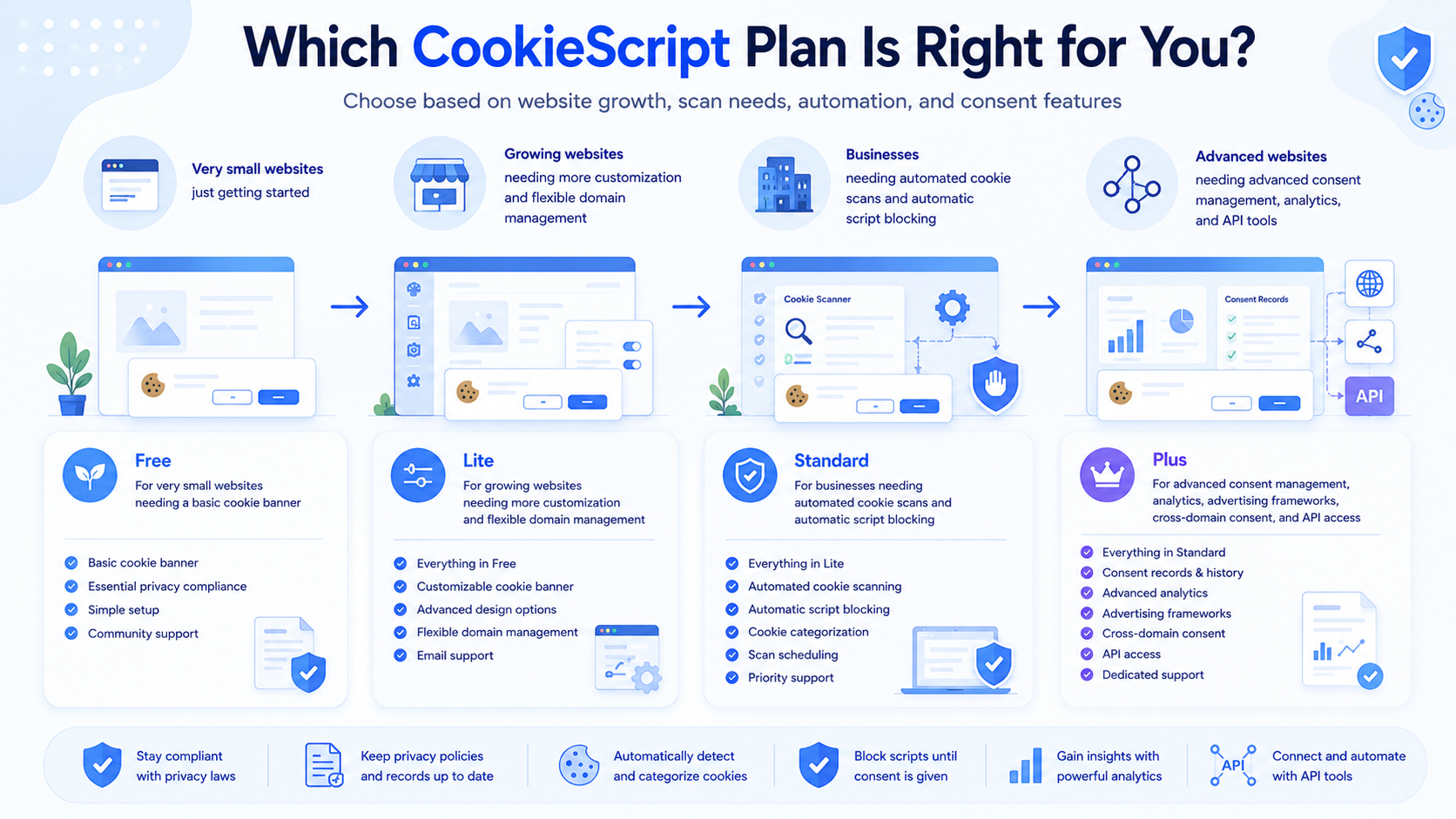
Lite covers the basic paid functionality, while Standard adds the main automation features.
Standard is a stronger option when your website has more content or when you want CookieScript to scan the website and update blocking rules automatically.
| Feature | Lite | Standard |
|---|---|---|
| Price for 2 domains | €8/month | €15/month |
| Pages scanned per domain | 100 | 1,000 |
| Monthly pageviews | Unlimited | Unlimited |
| Privacy Policy generator | Included | Included |
| Self-hosted code | Included | Included |
| Geo-targeting | Included | Included |
| Custom colors | Included | Included |
| Automatic monthly scans | Not included | Included |
| Automatic script blocking | Not included | Included |
| Best for | Smaller websites needing paid customization | Businesses needing automation and higher scan limits |
If your website changes regularly, Standard may provide better long-term value than Lite. Automatic monthly scans and script blocking reduce the amount of manual maintenance required.
CookieScript Standard vs Plus
Standard includes the main automation features, while Plus adds CookieScript’s advanced consent management and reporting tools.
Plus is designed for businesses that need detailed consent records, analytics, advertising framework support, cross-domain consent, or API access.
| Feature | Standard | Plus |
|---|---|---|
| Price for 2 domains | €15/month | €19/month |
| Pages scanned per domain | 1,000 | 3,000 |
| Monthly pageviews | Unlimited | Unlimited |
| Automatic monthly scans | Included | Included |
| Automatic script blocking | Included | Included |
| Cookie banner analytics | Not included | Included |
| User consent recording | Not included | Included |
| IAB TCF integration | Not included | Included |
| Cookie banner sharing | Not included | Included |
| Cross-domain consent | Not included | Included |
| API access | Not included | Included |
| Best for | Businesses needing automated cookie management | Advanced advertising, analytics, and consent requirements |
Does CookieScript Offer a Money-Back Guarantee?
CookieScript offers a seven-day money-back guarantee on its paid plans. You can request a full refund within seven days of purchase if the service is not the right fit.
Partial refunds are generally not available after the seven-day refund period. It is therefore worth testing the plan soon after purchase and checking that the domain and scan limits meet your needs.
Try scanning your website, reviewing the detected cookies, and testing your cookie banner configuration during the refund period so you can confirm the plan meets your requirements.
Is CookieScript Pricing Worth It?
CookieScript pricing can offer good value for website owners who need flexible multi-domain pricing and clear differences between basic customization, automation, and advanced consent features.
Lite is suitable when you mainly need unlimited pageviews, higher scan capacity, and branding controls. Standard provides stronger value for websites that benefit from automated monthly scans and automatic script blocking.
Plus costs more, but it includes tools that larger businesses, publishers, advertisers, and agencies may need, including consent recording, banner analytics, IAB TCF integration, cross-domain consent, and API access.
The main limitation is that the total cost depends on how many active domains you manage. Large agencies should compare the higher domain tiers or request a custom quote.
For a complete breakdown of usability, integrations, cookie blocking, and other features, read our CookieScript Review.
Overall, CookieScript offers one of the more flexible pricing models because you only pay for the domains and functionality you actually need instead of paying for traffic alone.
Pros
- Free plan available for small websites
- Paid plans include unlimited monthly pageviews
- Flexible pricing for multiple active domains
- Clear scan limits for different website sizes
- Standard includes useful automation features
- Plus includes consent records, analytics, and API access
- Seven-day money-back guarantee on paid plans
Cons
- Free plan has low scan and pageview limits
- Pricing changes according to the number of domains
- Lite does not include automatic monthly scanning
- Advanced consent tools require Plus
- VAT may increase the final checkout price
- Seven days is a relatively short refund period
CookieScript Pricing vs Other Cookie Consent Tools
CookieScript differs from many competitors because it combines domain-based pricing with separate page scan limits for each website.
This can provide good value for users managing several websites, especially because paid plans include unlimited monthly pageviews. However, websites with thousands of pages may need Plus or a custom scan package.
If you are still comparing providers, see our guide to the best cookie consent tools before making a final decision.
| Tool | Best For | Free Plan | Pricing Style | Compliance Focus |
|---|---|---|---|---|
| CookieYes | Beginners and small websites | Yes | Domains, pageviews, and scan limits | Beginner-friendly consent setup |
| Cookiebot | Stronger GDPR control | Yes | Domains and subpages | GDPR, ePrivacy, and advanced consent control |
| Termly | Cookie consent and legal policies | Yes | Websites, banner views, policies, and features | Consent management and privacy documents |
| Complianz | WordPress users | Yes | Annual licences based on website count | WordPress-focused privacy and consent tools |
| CookieScript | Multiple websites and scalable scan limits | Yes | Domains, scan limits, and features | Flexible multi-platform cookie consent |
| CookieHub | Websites with growing traffic | Yes | Monthly sessions, scans, and features | Global consent management and Google integrations |
Want to compare CookieScript features before looking only at price?
Should You Choose CookieScript?
CookieScript is a strong option if you need a cookie consent platform that can scale across several domains and does not limit pageviews on paid plans.
It is particularly useful for businesses that want a clear upgrade path from basic customization to automatic scanning and advanced consent management.
It may be less suitable if you need to scan more than several thousand pages on each domain or if you prefer a fixed single-site price that does not change with your domain count.
Choose CookieScript Free if you have a very small website, modest traffic, and only need a basic consent banner.
Choose Lite if you need unlimited pageviews, higher scan capacity, geo-targeting, and branding controls.
Choose Standard if you want automatic monthly scans and automatic script blocking.
Choose Plus if you need consent recording, banner analytics, IAB TCF integration, cross-domain consent, or API access.
Final Verdict: Is CookieScript Pricing Fair?
CookieScript pricing is flexible and relatively easy to understand once you separate the three main factors: active domains, pages scanned per domain, and included features.
Lite is suitable for basic paid use, Standard provides the strongest automation value, and Plus is designed for advanced consent and advertising requirements. The best plan depends on how many domains you manage and how much of each website CookieScript needs to scan.
If you’re still unsure which plan to choose, start with the Free plan for a small website and upgrade later as your traffic, scan requirements, or compliance needs increase.
Next Step: Review CookieScript
Before selecting a CookieScript plan, read the full review to compare its banner customization, cookie scanner, script blocking, integrations, and consent management features.

Frequently Asked Questions
Common questions about this topic
Yes. CookieScript offers a Free plan for small websites. It includes a basic cookie banner, a limited page scan allowance, and a monthly pageview limit.
With two domains selected in the euro pricing calculator shown here, Lite costs €8 per month, Standard costs €15 per month, and Plus costs €19 per month. The total changes according to the number of domains selected.
CookieScript pricing is based mainly on the number of active domains, the number of pages scanned per domain, and the features included in the selected plan.
It is the maximum number of pages CookieScript’s scanner checks on each website during a scan. Your website can have more pages, but the scanner stops after reaching the plan limit.
The Free plan has a monthly pageview limit. Lite, Standard, and Plus include unlimited monthly pageviews according to the pricing option shown.
Not always. Subdomains can share the parent domain’s banner when they use the same configuration and cookie report. A subdomain requiring a separate banner and report generally counts as another website.
Yes. CookieScript allows users to upgrade by paying the difference between the current plan and the new plan for the remaining subscription period.
Yes. CookieScript offers a full refund when requested within seven days of purchase. Partial refunds are generally not provided after that period.