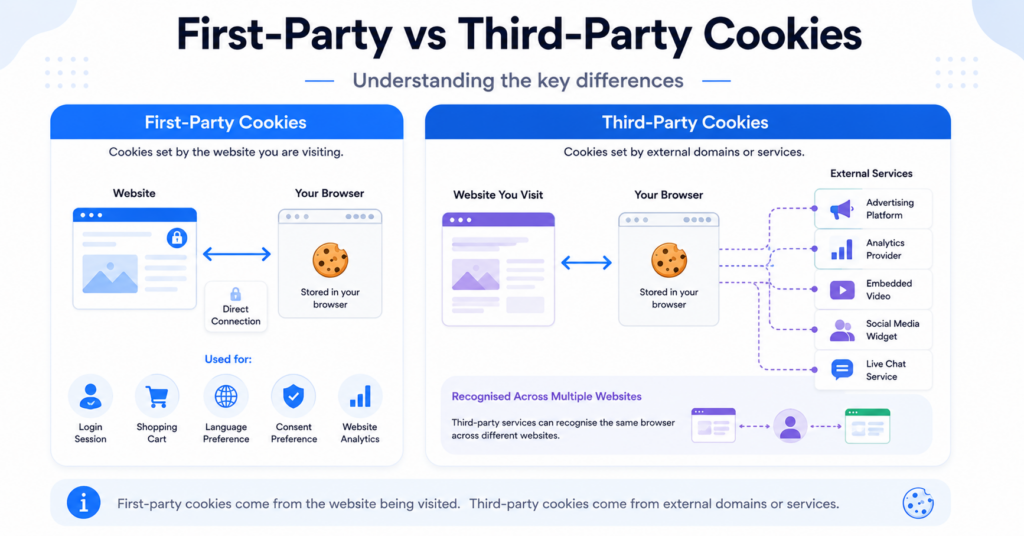
Website cookies are often divided into two main groups: first-party cookies and third-party cookies. The difference depends mainly on which domain creates the cookie and how it is used.
First-party cookies are created by the website a visitor is currently using. They commonly support essential features such as login sessions, shopping carts, language preferences, and website analytics. Third-party cookies are created by an external service and are often connected to advertising, cross-site tracking, embedded content, or other third-party tools.
Understanding the difference between first-party and third-party cookies can help you identify the technologies running on your website, organise cookies correctly, and configure your cookie banner.
First-party cookies are created by the website a visitor is currently viewing. Third-party cookies are created by another domain or external service. First-party cookies usually support website functionality and analytics, while third-party cookies are commonly used for advertising, tracking, embedded content, and external integrations.
Not sure which cookies your website uses? Run a scan with the CookieBannerGuide Cookie Scanner to identify cookies, scripts, providers, and possible consent issues.
What Are First-Party Cookies?
First-party cookies are created and stored by the same website domain that a visitor is currently using.
For example, when someone visits:
example.com
a cookie created directly by example.com is considered a first-party cookie.
These cookies allow the website to remember information between page views or future visits. Without them, many common website features would not work properly.
First-party cookies may remember:
- Whether a visitor is logged in
- Products added to a shopping cart
- A selected language or currency
- Cookie consent preferences
- Website display settings
- Basic analytics information
- Security and session details
First-party cookies are usually easier for website owners to control because they are connected directly to the website’s own domain. However, being first-party does not automatically mean that a cookie is essential or exempt from consent requirements.
A cookie’s domain does not determine whether consent is required. A first-party analytics or advertising cookie may still be non-essential, even though it is created under your own website domain.
How First-Party Cookies Work
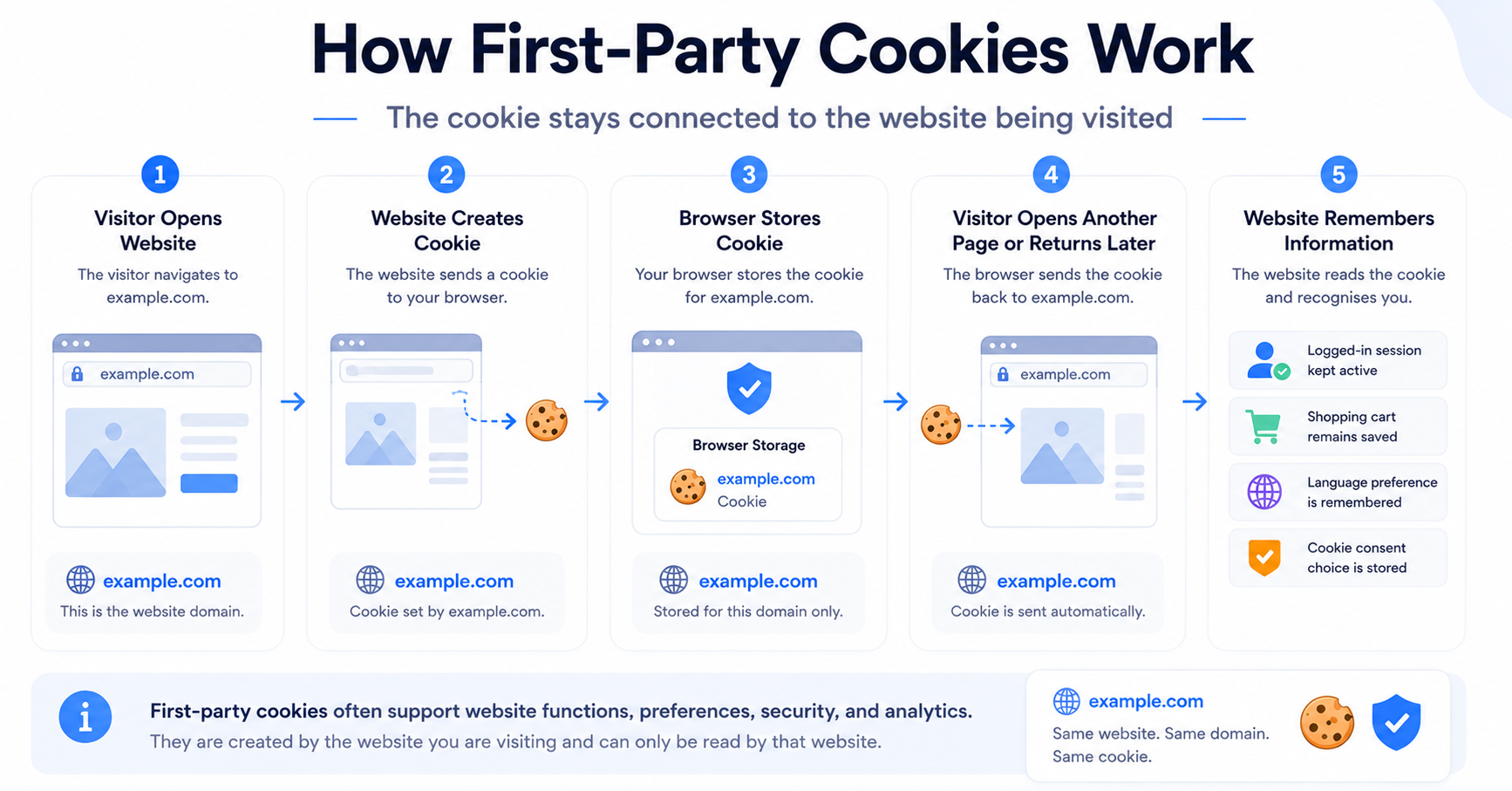
When a visitor opens a website, the website server or a script running on that website may send a cookie to the visitor’s browser.
The browser stores the cookie and may return it to the same website during future page requests. This allows the website to recognise the browser and remember selected information.
A simplified process looks like this:
- A visitor opens a website.
- The website creates a first-party cookie.
- The visitor’s browser stores the cookie.
- The browser sends the cookie back to the same website during future visits or page requests.
- The website uses the stored information to provide the relevant feature or experience.
For example, an online shop may use a first-party cookie to remember which products a visitor added to their basket. Without that cookie, the shopping cart could become empty whenever the visitor opened another page.
Common First-Party Cookie Examples
First-party cookies can support many different website functions.
| Use | Example | Typical purpose |
|---|---|---|
| Login session | Authentication or session cookie | Keeps a visitor signed in while moving between pages. |
| Shopping cart | Cart or basket cookie | Remembers products added to an online shopping cart. |
| Cookie consent | Consent preference cookie | Stores whether the visitor accepted or rejected cookie categories. |
| Language settings | Language preference cookie | Remembers the visitor’s preferred website language. |
| Website security | Security or anti-fraud cookie | Helps protect accounts, forms, and checkout processes. |
| Analytics | First-party analytics cookie | Measures website visits, page views, and user activity. |
First-party cookies may belong to different categories. Some are necessary, while others may be functional, analytical, or marketing-related. You can learn more about these classifications in our guide to the different types of website cookies.
Are First-Party Cookies Safe?
First-party cookies are generally considered less intrusive than cookies used for tracking visitors across unrelated websites. They normally operate within one website and help provide features that the visitor expects.
However, first-party cookies can still collect information about visitor behaviour. Their privacy impact depends on:
- What information the cookie stores
- Why the information is collected
- How long the cookie remains active
- Whether the data is shared with other organisations
- Whether the cookie is used for analytics or advertising
- Whether valid consent has been collected where required
Website owners should therefore review all cookies individually instead of assuming that every first-party cookie is automatically harmless or necessary.
What Are Third-Party Cookies?
Third-party cookies are created by a domain other than the website a visitor is currently viewing.
For example, a visitor may be browsing:
example.com
but the page may load an advertising, analytics, video, chat, or social media service from:
thirdpartyservice.com
If that external domain creates a cookie in the visitor’s browser, it may be classified as a third-party cookie.
Third-party cookies are often connected to:
- Online advertising
- Cross-site tracking
- Audience measurement
- Retargeting campaigns
- Social media integrations
- Embedded videos and maps
- External chat or support tools
- Affiliate tracking
Unlike a typical first-party cookie, a third-party cookie may allow an external provider to recognise the same browser across several different websites that use its technology.
A visitor views a product on an online shop and later sees an advertisement for the same product on another website. Advertising technologies and cross-site identifiers may have been used to connect those visits.
How Third-Party Cookies Work
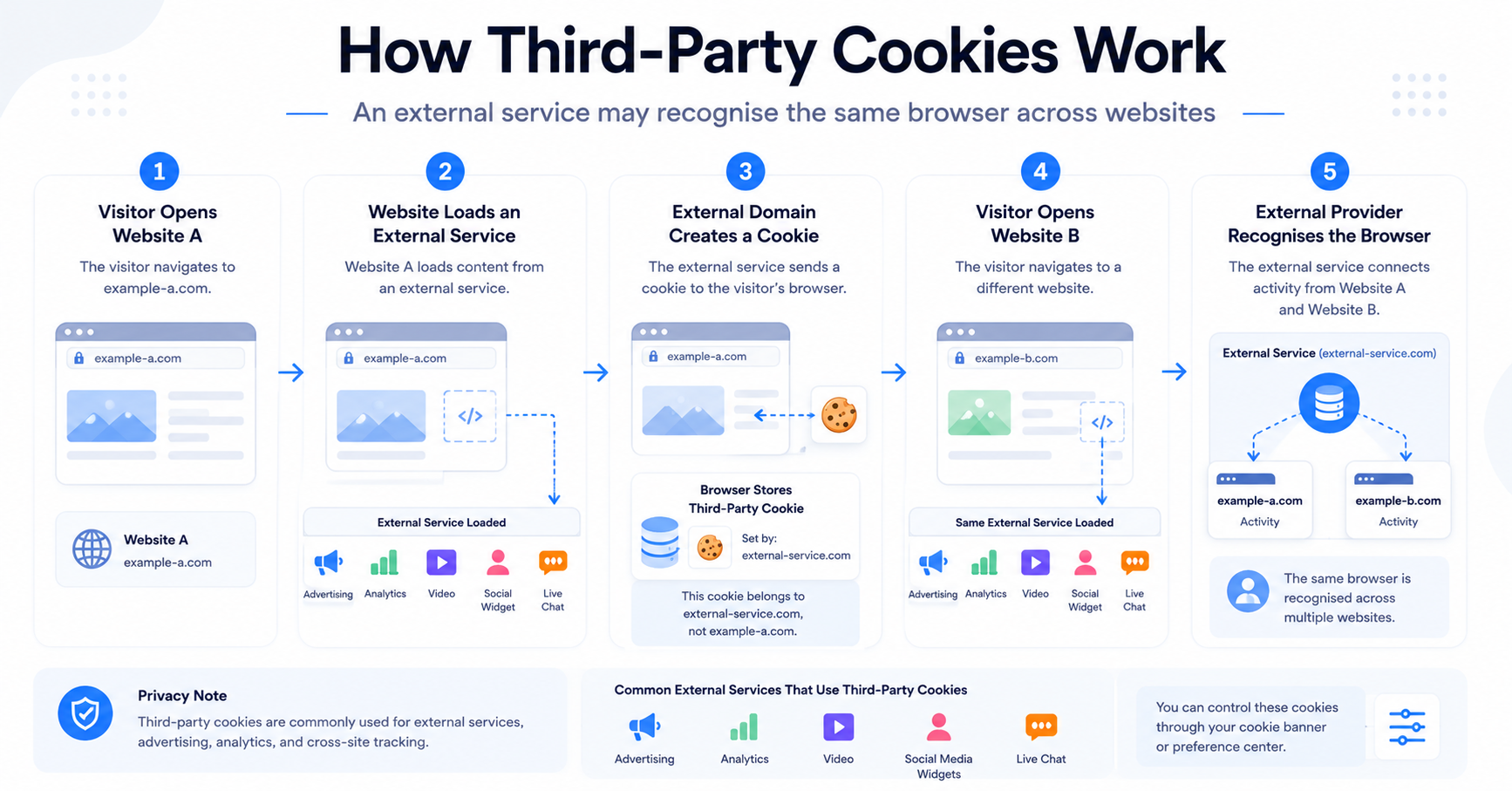
Third-party cookies usually appear when a website loads content or code from an external domain.
A simplified process may look like this:
- A visitor opens a website.
- The website loads a script, advertisement, video, map, or widget from an external provider.
- The external provider sends a cookie to the visitor’s browser.
- The browser stores the cookie under the external provider’s domain.
- The provider may recognise the browser when its services appear on other websites.
For example, a website may include an embedded video hosted by a separate video platform. Loading or interacting with that video may send requests to the external provider and activate cookies or similar browser storage technologies.
Common Third-Party Cookie Examples
Third-party technologies are widely used across business websites, online shops, blogs, and publishing platforms.
| Service type | Example use | Possible purpose |
|---|---|---|
| Advertising network | Displaying personalised advertisements | Ad targeting, frequency control, and campaign measurement. |
| Social media widget | Like, share, or follow buttons | Social interaction and visitor tracking. |
| Embedded video | Video player from an external platform | Video delivery, analytics, and personalisation. |
| Analytics provider | Measuring website behaviour | Traffic analysis and performance reporting. |
| Live chat service | Customer support widget | Chat sessions, visitor recognition, and support history. |
| Affiliate platform | Tracking referrals and purchases | Attribution and commission calculation. |
| Embedded map | Displaying a location or directions | Map functionality, preferences, and service analytics. |
Not every external integration creates a traditional third-party cookie. Some providers use first-party identifiers, local storage, tracking pixels, server-side tracking, or other technologies instead. This is why a complete cookie review should look beyond cookie names alone.
Are Third-Party Cookies Always Used for Advertising?
No. Advertising is one of the most common uses, but third-party cookies can support other services as well.
For example, an external provider may use a cookie to:
- Maintain an embedded video session
- Remember settings inside a third-party widget
- Protect a form from spam or abuse
- Enable live chat functionality
- Measure whether an external service is working correctly
- Connect a purchase to an affiliate referral
The cookie’s purpose, rather than the provider’s name alone, should determine how it is classified in your cookie banner and cookie policy.
First-Party vs Third-Party Cookies: Key Differences
The main difference between first-party and third-party cookies is the relationship between the cookie’s domain and the website the visitor is currently using.
A first-party cookie belongs to the website being visited. A third-party cookie belongs to an external domain whose technology has been loaded on that website.
| Feature | First-Party Cookies | Third-Party Cookies |
|---|---|---|
| Created by | The website the visitor is currently using. | An external domain or third-party service. |
| Domain | Matches the website being visited. | Different from the website being visited. |
| Typical uses | Login sessions, shopping carts, preferences, security, consent, and analytics. | Advertising, cross-site tracking, embedded content, social widgets, and external services. |
| Can follow users across websites? | Normally limited to one website. | May recognise a visitor across multiple websites using the same provider. |
| Browser support | Usually supported because many website functions depend on them. | More likely to be restricted or blocked by browser privacy controls. |
| Privacy impact | Usually lower, but depends on purpose and data use. | Often higher when used for profiling and cross-site tracking. |
| Consent requirement | Depends on whether the cookie is necessary or non-essential. | Often requires consent when used for advertising, analytics, or tracking. |
| Common examples | Session, cart, language, consent preference, and security cookies. | Advertising, retargeting, social media, affiliate, and embedded-service cookies. |
First-party and third-party describe who creates the cookie. Necessary, functional, analytical, and marketing describe why the cookie is used. These are separate ways of classifying cookies.
First-Party Does Not Always Mean Necessary
One of the most common misunderstandings is that all first-party cookies are necessary.
This is not correct.
A website may create a first-party cookie for:
- Essential login functionality
- Website analytics
- Advertising attribution
- Visitor profiling
- A/B testing
- Personalised content
The login cookie may be necessary, while the analytics or advertising cookie may be non-essential. Both can still be first-party cookies because they are stored under the website’s own domain.
When configuring a banner, classify cookies according to their actual purpose and review the applicable cookie banner requirements.
Third-Party Does Not Always Mean Harmful
Third-party cookies are often discussed negatively because they can support cross-site tracking and behavioural advertising. However, not every third-party service is harmful or unnecessary.
A website may depend on an external service for:
- Secure payments
- Fraud prevention
- Video hosting
- Live customer support
- Spam protection
- Accessibility tools
- Website performance services
The correct approach is not to treat all third-party technologies as identical. Website owners should identify each service, understand its purpose, and determine whether it should load before or after the visitor makes a consent choice.
Common First-Party and Third-Party Cookie Examples
The same website may use both first-party and third-party cookies at the same time.
For example, an online shop could use:
- A first-party session cookie to keep a visitor logged in
- A first-party cart cookie to remember selected products
- A first-party consent cookie to remember cookie preferences
- An analytics identifier for measuring website activity
- A third-party advertising service for retargeting
- A third-party video platform for product demonstrations
- A third-party chat provider for customer support
The table below shows how common website technologies may be used.
| Website feature | Possible cookie type | What you should check |
|---|---|---|
| User login | Usually first-party | Whether the cookie is limited to authentication and security. |
| Shopping cart | Usually first-party | Whether the cookie is required to provide the requested shopping feature. |
| Website analytics | May be first-party or third-party | How the identifier is stored, what data is collected, and whether consent is required. |
| Advertising pixel | Often third-party or connected to an external provider | Whether it tracks visitors, creates profiles, or supports retargeting. |
| Embedded video | Often third-party | Whether cookies or scripts load before the visitor interacts with the video. |
| Live chat | May use both | Whether the service stores visitor identifiers or conversation history. |
| Consent banner | Usually first-party | Whether the cookie only remembers the visitor’s consent preferences. |
Because modern websites use many plugins, scripts, and integrations, it is not always possible to identify every cookie by looking at the visible page alone.
How Can You Check Which Cookie Types Your Website Uses?
You can inspect cookies manually through your browser’s developer tools, but this can be difficult for non-technical website owners. It may also be necessary to check multiple pages and test different interactions, such as opening a video, submitting a form, logging in, or starting checkout.
A website cookie scanner can make the first review easier by crawling pages and identifying cookies, scripts, providers, and third-party services.
Use the free CookieBannerGuide Cookie Scanner to check which cookies and scripts may be active on your website. Review the detected domain and provider to help determine whether each cookie is first-party or third-party.
After the scan, review each result carefully. A scanner may not detect cookies that appear only after login, checkout, visitor interaction, consent, or location-specific conditions.
You should also compare the results with the plugins, analytics services, advertising tools, embedded content, and external integrations installed on your website.
Why Are Browsers Restricting Third-Party Cookies?
Third-party cookies have become more restricted because they can be used to recognise and track the same browser across multiple unrelated websites.
This type of cross-site tracking can help advertising platforms build detailed visitor profiles based on browsing behaviour, interests, purchases, and interactions. In many cases, visitors may not clearly understand which companies are collecting this information or how it is being used.
Browser privacy protections are designed to reduce this kind of tracking while still allowing websites to provide legitimate services such as payments, authentication, embedded content, and fraud prevention.
Common reasons for restricting third-party cookies include:
- Reducing cross-site visitor tracking
- Limiting behavioural profiling
- Giving users greater control over their data
- Preventing identifiers from following users across unrelated websites
- Reducing hidden data sharing between external services
- Encouraging more privacy-focused website technologies
Safari and Third-Party Cookies
Safari uses Intelligent Tracking Prevention to limit cross-site tracking. WebKit states that its tracking protection blocks third-party cookies by default, although certain legitimate access may be possible through browser-controlled methods such as the Storage Access API.
You can read more in WebKit’s official Tracking Prevention documentation.
Firefox and Third-Party Cookies
Firefox uses Enhanced Tracking Protection and Total Cookie Protection to reduce cross-site tracking. Rather than allowing one shared third-party identifier to operate freely across websites, Firefox can separate stored data by the top-level website where it was created.
This helps external services continue working in some situations while making it more difficult to use the same cookie for tracking a visitor across unrelated websites.
Chrome and Third-Party Cookies
Google previously planned a broad phase-out of third-party cookies in Chrome. However, Google later decided to maintain its existing approach of giving users third-party cookie choices through Chrome’s privacy and security settings.
Chrome’s Incognito mode blocks third-party cookies by default, and individual users can also change their cookie settings. Website owners should therefore not assume that third-party cookies will work for every Chrome visitor.
For the latest information, see Google’s official Privacy Sandbox update.
Third-party cookies have not disappeared from every browser. Their availability depends on the browser, privacy settings, browsing mode, extensions, and the way the external service stores information.
What Happens When Third-Party Cookies Are Blocked?
When a browser blocks a third-party cookie, the external service may be unable to store or read the same identifier in the usual way.
This can affect features such as:
- Cross-site advertising profiles
- Retargeting campaigns
- Advertising frequency control
- Cross-site conversion attribution
- Audience building
- Embedded login sessions
- Some personalisation features
- External widgets that depend on shared browser storage
Blocking a third-party cookie does not always block the entire external service. A video, map, payment form, or chat widget may still load while some tracking or personalisation features remain unavailable.
External providers may also use alternatives such as:
- First-party cookies
- Partitioned cookies
- Local storage
- Server-side tracking
- Tracking pixels
- URL parameters
- Account-based identifiers
- Aggregated or modelled measurement
This means that blocking traditional third-party cookies does not automatically stop all tracking. A complete privacy review should include scripts, pixels, browser storage, server-side tools, and external data sharing.
The move away from unrestricted third-party cookies does not mean that website tracking has ended. Tracking technologies continue to evolve, which is why regular cookie scans and consent testing remain important.
Are Third-Party Cookies Illegal?
No. Third-party cookies are not automatically illegal.
The compliance question depends on factors such as:
- The purpose of the cookie
- The type of information collected
- Whether the cookie is necessary for a requested service
- Whether valid consent is required and collected
- Whether the visitor receives clear information
- Which privacy laws apply to the website and visitor
- How the external provider uses or shares the data
For example, a third-party cookie used for secure payment processing may have a different purpose and legal basis from a third-party advertising cookie used to track visitors across websites.
In many European situations, non-essential advertising, analytics, and tracking cookies should not be activated before the visitor has provided valid consent.
Your cookie banner should also make it reasonably easy to reject non-essential cookies and later change or withdraw consent. Read our beginner’s guide to GDPR cookie consent for a broader explanation.
CookieBannerGuide provides general educational information and not legal advice. Requirements can depend on your location, audience, technologies, and data processing practices.
First-Party and Third-Party Cookies Under GDPR
The GDPR does not divide cookies into a simple rule where all first-party cookies are allowed and all third-party cookies require consent.
Instead, the purpose and use of the cookie matter.
A cookie may require consent when it is used for purposes such as:
- Advertising
- Cross-site tracking
- Behavioural profiling
- Non-essential analytics
- Personalised content
- Social media tracking
- Measuring advertising performance
This can apply even when the identifier is stored as a first-party cookie.
By contrast, a cookie that is strictly necessary to provide a feature requested by the visitor may be treated differently. Examples may include maintaining a shopping cart, protecting account security, or remembering a cookie consent choice.
What Website Owners Should Do
Website owners should review both first-party and third-party cookies and document:
- The cookie name
- The provider or domain
- The purpose
- The category
- The storage duration
- Whether information is shared externally
- Whether the cookie loads before consent
- How the visitor can change their choice
This information can be used to configure your consent categories and create a more accurate cookie policy page.
Do First-Party Cookies Require Consent?
Some first-party cookies require consent and others may not.
A first-party cookie may not require prior consent when it is strictly necessary to provide a service the visitor has actively requested. Common examples can include:
- Login session cookies
- Shopping cart cookies
- Security cookies
- Load-balancing cookies
- Cookie consent preference cookies
A first-party cookie may require consent when it supports a non-essential purpose such as:
- Analytics
- Advertising attribution
- Visitor profiling
- A/B testing
- Personalised recommendations
- Marketing automation
The fact that a cookie appears under your own domain does not remove the need to understand why it is being used.
Do Third-Party Cookies Require Consent?
Many third-party cookies require consent because they are used for advertising, analytics, profiling, embedded media, or cross-site tracking.
However, the answer still depends on the exact purpose.
Website owners should avoid automatically placing every external cookie into the marketing category. Instead, review what the provider does and why the technology is active.
A third-party service may provide:
- Necessary payment functionality
- Fraud prevention
- Authentication
- Spam protection
- Functional embedded content
- Analytics
- Advertising or retargeting
These purposes may need different consent categories and different loading behaviour.
If you are unsure whether your site requires a consent banner, read Does My Website Need a Cookie Banner?.
How Should a Cookie Banner Handle These Cookies?
A properly configured banner should focus on cookie purpose rather than only whether a cookie is first-party or third-party.
A practical consent setup may include categories such as:
| Category | Possible first-party use | Possible third-party use |
|---|---|---|
| Necessary | Login session, cart, security, and consent preferences. | Payment security, fraud prevention, or essential authentication. |
| Functional | Language, layout, or website preferences. | Chat widgets, video settings, maps, or external accessibility tools. |
| Analytical | First-party website measurement identifiers. | External analytics or audience measurement services. |
| Marketing | First-party advertising attribution or visitor profiling. | Retargeting, advertising networks, and cross-site tracking. |
Where consent is required, non-essential scripts should normally remain inactive until the visitor selects the relevant category.
Your banner should also provide clear choices and should not make rejection unnecessarily difficult. Our good and bad cookie banner examples show how different designs affect clarity and user choice.
Does Google Analytics Use First-Party or Third-Party Cookies?
Google Analytics commonly uses cookies stored under the website’s own domain, which means they are generally treated as first-party cookies from a browser perspective.
However, Google Analytics is still an external analytics service, and information may be processed by an external provider. The first-party cookie label does not automatically make the service necessary or remove possible consent requirements.
This is an important example of why website owners should consider both:
- Technical classification: which domain stores the cookie
- Purpose classification: why the cookie and related service are used
Websites using Google services may also need to understand Google Consent Mode, which communicates visitor consent choices to supported Google tags.
Can Third-Party Services Use First-Party Cookies?
Yes. A third-party service can sometimes create or use an identifier stored under the website’s own domain.
This can happen when:
- A third-party script runs directly on the website
- A tag manager loads an external service
- A provider uses a first-party cookie for analytics or attribution
- A server-side configuration sets cookies through the website domain
- A custom domain is connected to an external platform
Technically, the cookie may appear first-party because its domain matches the website. However, the external provider may still receive or process information connected to that identifier.
This means cookie classification should not rely only on the domain column in a scanner report. You should also identify the script, provider, destination requests, and purpose.
When reviewing a cookie, ask two separate questions: “Which domain stores it?” and “Which organisation or service uses the information?” The answers may not always be the same.
How to Identify First-Party and Third-Party Cookies
You can identify cookie types by checking the website domain, cookie domain, provider, and scripts that created the cookie.
Method 1: Use Browser Developer Tools
Most desktop browsers allow you to inspect stored cookies through their developer tools.
A general process is:
- Open the website in your browser.
- Open the browser’s developer tools.
- Find the storage, application, or cookies section.
- Review the domains listed under cookies.
- Compare each cookie domain with the website domain.
- Reload the page and interact with videos, forms, or widgets.
- Check whether additional cookies appear.
If the cookie domain matches the website being visited, it is generally first-party in that context. If it belongs to a different domain, it may be third-party.
However, manual inspection can be time-consuming and may not explain the cookie’s actual purpose.
Method 2: Run a Cookie Scan
A cookie scanner can crawl multiple website pages and create a list of detected cookies, scripts, domains, and providers.
Enter your website address into the CookieBannerGuide Cookie Scanner to identify cookies and third-party services that may be active on your pages.
After receiving the results:
- Compare the cookie domain with your website domain.
- Review the listed provider.
- Identify which plugin, script, or integration created it.
- Confirm the cookie’s actual purpose.
- Check whether it appears before or after consent.
- Assign the correct consent category.
Method 3: Review Your Website Tools
Create a list of all services installed or embedded on the website, including:
- Analytics tools
- Advertising pixels
- Tag managers
- Video players
- Maps
- Chat widgets
- Payment services
- Contact forms
- Social media plugins
- Affiliate tracking tools
Compare this list with the scanner report and browser results. This can help identify unknown cookies and services that were missed during an automated scan.
How to Reduce Unnecessary Third-Party Cookies
After identifying third-party cookies, review whether every external tool is still needed.
You may be able to reduce unnecessary cookies by:
- Removing unused plugins and scripts
- Deleting old advertising pixels
- Replacing unnecessary social media widgets with normal links
- Using privacy-enhanced video embedding options
- Loading maps, videos, or chat tools only after consent
- Removing duplicate analytics tools
- Reviewing tag manager containers
- Using fewer external website services
Reducing unnecessary third-party technologies can improve privacy, make consent management easier, and sometimes improve website performance.
However, replacing a third-party cookie with a first-party identifier does not automatically solve the privacy issue. The purpose, data collection, and external sharing should still be reviewed.
Common Mistakes Website Owners Make
First-party and third-party cookie terminology can be confusing. Common mistakes include:
- Assuming all first-party cookies are necessary
- Assuming all third-party cookies are illegal
- Looking only at cookie domains and ignoring providers
- Forgetting about local storage, pixels, and server-side tracking
- Allowing analytics or advertising scripts to load before consent
- Copying cookie descriptions without verifying their purpose
- Failing to scan again after adding a plugin or integration
- Believing browser blocking replaces a consent banner
Browser privacy features can reduce tracking, but website owners remain responsible for configuring their own technologies appropriately.
Our article about what happens if you do not have a cookie banner explains why relying only on browser settings may be insufficient.
Final Thoughts
The main difference between first-party and third-party cookies is the domain that creates and stores the cookie.
First-party cookies are connected to the website being visited. They commonly support login sessions, shopping carts, preferences, security, consent choices, and analytics.
Third-party cookies are connected to external domains or services. They may support advertising, analytics, embedded content, payments, social media, chat tools, and cross-site tracking.
However, the technical label does not tell you whether a cookie is necessary, harmless, or compliant. A first-party cookie can still be used for advertising, while a third-party cookie may support an important website function.
The best approach is to scan your website, identify every provider, review the actual purpose of each technology, and configure your banner according to purpose rather than domain alone.
Next Step: Check Your Website Cookies
Now that you understand the difference between first-party and third-party cookies, scan your website to see which cookies, scripts, and external services are currently active.
Frequently Asked Questions
Common questions about this topic
A first-party cookie is created under the domain the visitor is currently using. A third-party cookie is created under a different domain or by an external service loaded on that website.
First-party cookies are generally less useful for cross-site tracking and often support normal website functions. However, they can still be used for analytics, profiling, or advertising. Their privacy impact depends on their purpose and data use.
No. First-party cookies may be necessary, functional, analytical, or marketing-related. Their category should be based on what they do, not only on the domain that stores them.
No. Third-party cookies may also support payments, authentication, embedded videos, chat services, fraud prevention, and other external functionality. Each cookie should be reviewed individually.
Third-party cookies are already restricted or partitioned by several browsers, but they have not disappeared from every browser. Their availability depends on the browser, privacy settings, browsing mode, and technical implementation.
Chrome blocks third-party cookies by default in Incognito mode. In regular browsing, users can control third-party cookie behaviour through Chrome’s privacy and security settings.
Safari’s Intelligent Tracking Prevention blocks third-party cookies by default and applies additional protections against cross-site tracking.
Firefox uses Enhanced Tracking Protection and Total Cookie Protection to block or isolate cross-site tracking data. The exact behaviour can depend on the visitor’s protection settings and the service involved.
Google Analytics commonly uses cookies stored under the website’s own domain, making them first-party from a browser perspective. However, the service is still provided externally, and consent may be required depending on the setup and applicable rules.
Yes. An external script or platform can sometimes create an identifier under the website’s own domain. The cookie may technically be first-party while data is still processed by an external provider.
You can inspect cookie domains using browser developer tools or run the CookieBannerGuide Cookie Scanner. You should also review the plugins, scripts, and external integrations installed on your website.
Consent is commonly required for third-party advertising, analytics, profiling, and tracking cookies. However, the exact requirement depends on the purpose, technical setup, applicable laws, and whether the technology is strictly necessary.