If you’ve recently set up Google Analytics, Google Ads, or a cookie consent tool, you’ve probably come across the term Google Consent Mode. While it may sound complicated, its purpose is actually quite simple.
Google Consent Mode helps Google services adjust how they behave based on a visitor’s cookie consent choices. It works together with your cookie banner or Consent Management Platform (CMP), allowing Google tags to respect the permissions a visitor has given.
In this guide, you’ll learn what Google Consent Mode is, how it works, what Consent Mode v2 changed, and whether your website needs it.
Google Consent Mode is a feature that allows Google tags, such as Google Analytics and Google Ads, to adjust their behaviour based on a visitor’s consent choices. It works alongside a cookie banner or Consent Management Platform (CMP) but does not collect consent or display a cookie banner on its own.
What Is Google Consent Mode?
Google Consent Mode is a feature developed by Google that communicates a visitor’s cookie consent choices to Google services.
Instead of deciding whether a visitor should see a cookie banner, Consent Mode simply tells Google tags which types of data they are allowed to use based on the visitor’s decision.
For example, if a visitor accepts analytics cookies, Google Analytics can operate normally. If analytics consent is declined, Google Analytics changes how it behaves according to the consent settings received.
Google Consent Mode works with services such as:
- Google Analytics 4 (GA4)
- Google Ads
- Google Tag Manager
- Floodlight
- Conversion Linker
It’s important to understand that Google Consent Mode is not a cookie banner and not a Consent Management Platform. Instead, it works alongside these tools by communicating the visitor’s consent choices to Google’s services.
Google Consent Mode does not ask visitors for permission. Your website still needs a cookie banner or Consent Management Platform (CMP) to collect consent before Google Consent Mode can use those choices.
How Does Google Consent Mode Work?
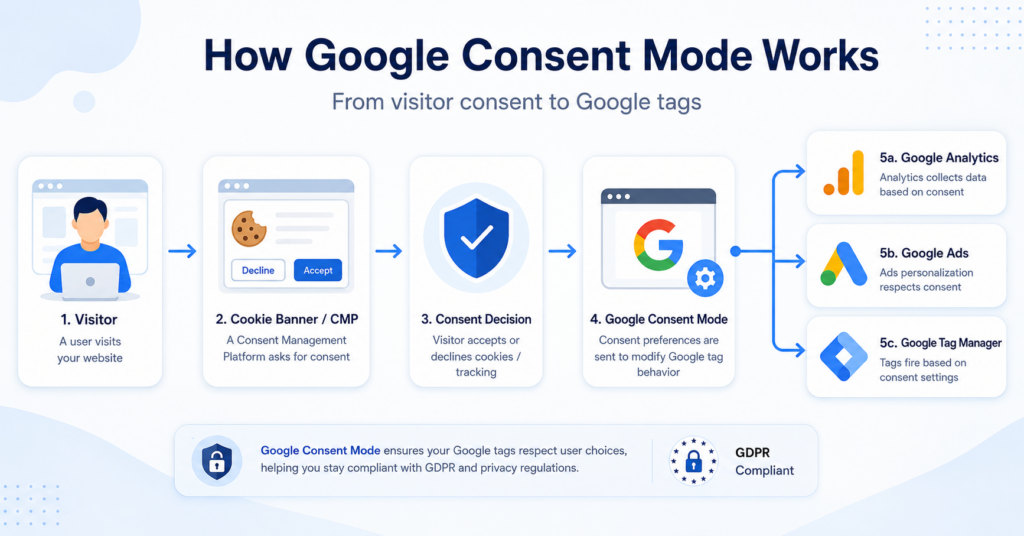
Google Consent Mode follows a simple process that starts when someone visits your website.
1. The visitor arrives on your website
When the page loads, your cookie banner or CMP is displayed before non-essential cookies are activated.
2. The visitor chooses their cookie preferences
The visitor can accept, reject, or customise different cookie categories, depending on how your banner has been configured.
3. The CMP sends consent signals
Once the visitor makes a choice, the Consent Management Platform sends consent signals to Google Consent Mode.
These signals tell Google services which types of storage and processing are allowed.
4. Google tags adjust their behaviour
Google Analytics, Google Ads, and other supported Google tags respond to those consent signals.
If consent has been granted, they can operate normally. If consent has been denied, they limit or change how data is collected and processed according to Google’s Consent Mode specifications.
5. The website continues to respect the visitor’s choices
If the visitor later changes their cookie preferences, the updated consent signals are automatically passed to Google services.
Google Consent Mode v2 Explained
In 2024, Google introduced Consent Mode v2, adding two new consent signals alongside the original settings.
The original version mainly focused on analytics and advertising storage. Version 2 expands this by providing Google services with additional information about how personal data and advertising personalisation should be handled.
The four main consent signals are:
| Consent Signal | Purpose |
|---|---|
| analytics_storage | Controls analytics cookies and measurement. |
| ad_storage | Controls advertising-related storage. |
| ad_user_data | Controls whether user data can be shared for advertising purposes. |
| ad_personalization | Controls whether personalised advertising is allowed. |
These signals help Google products understand what level of consent has been given without replacing your website’s own consent management process.
If you use Google Ads for personalised advertising or audience measurement, these additional consent signals have become increasingly important.
Google provides detailed implementation guidance in its official Consent Mode documentation.
Why Is Google Consent Mode Important?
Many websites rely on Google Analytics and Google Ads to understand visitor behaviour and measure marketing performance.
Without a way to communicate consent choices, Google services cannot easily distinguish between visitors who have given permission and those who have not.
Google Consent Mode helps bridge this gap by allowing Google tags to respond appropriately to each visitor’s consent decision.
Some of the main benefits include:
- Works together with your cookie banner or CMP
- Allows Google tags to respect visitor consent choices
- Supports Google Analytics and Google Ads integrations
- Automatically updates Google tags if consent preferences change
- Provides a more consistent consent experience across Google’s products
Google Consent Mode is therefore not designed to replace privacy compliance tools. Instead, it acts as the communication layer between your consent solution and Google’s services.
Basic vs Advanced Google Consent Mode
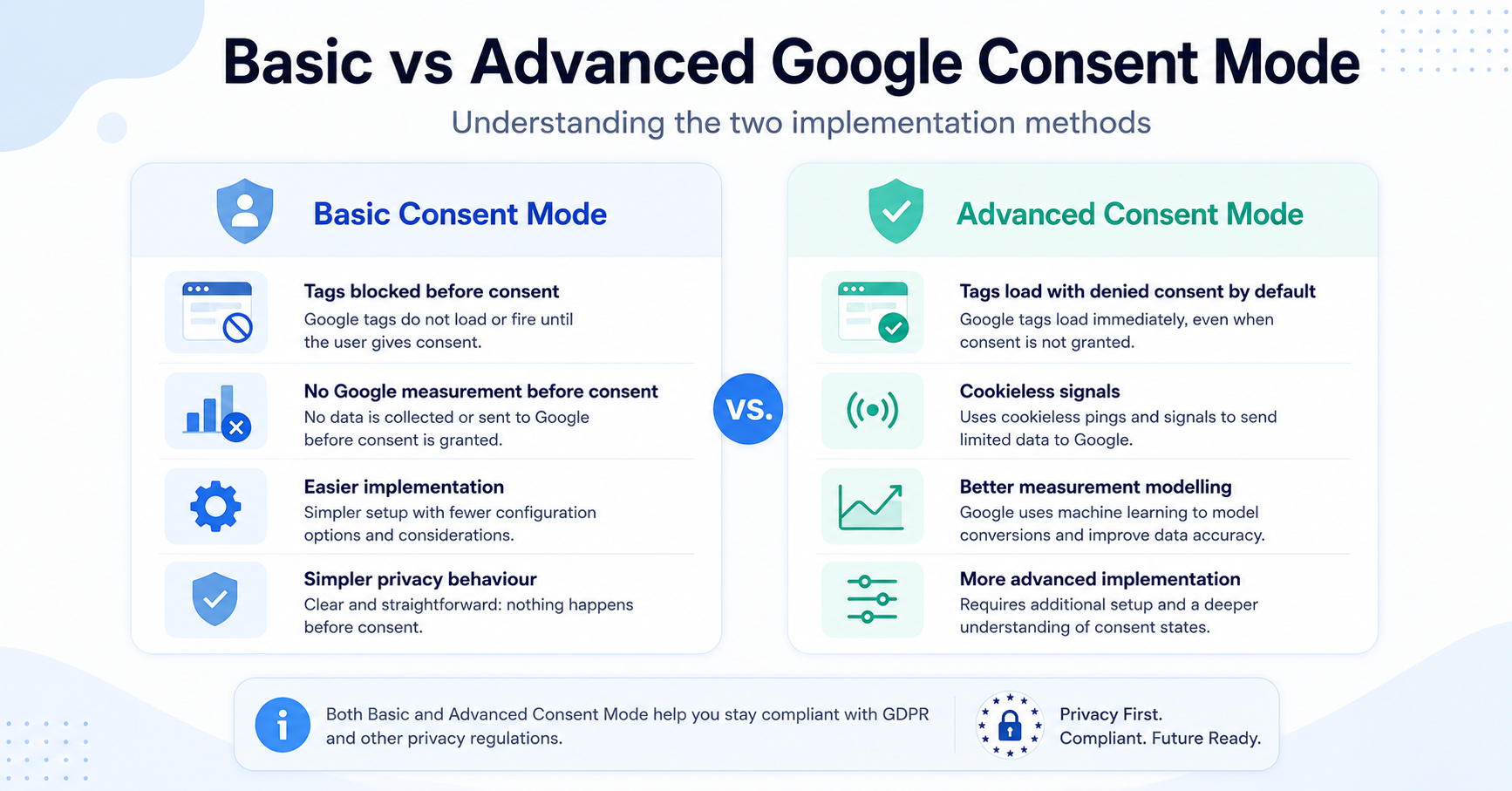
Google Consent Mode can be implemented in two different ways: basic and advanced.
Both versions use the visitor’s consent choices, but they handle Google tags differently before consent is granted.
| Feature | Basic Consent Mode | Advanced Consent Mode |
|---|---|---|
| Google tags before consent | Tags are blocked until the visitor interacts with the consent banner. | Tags can load with consent settings set to denied by default. |
| Data sent before consent | No data is sent to Google before consent is granted. | Limited cookieless signals may be sent when consent is denied. |
| Cookies after rejection | Google tags remain blocked. | Google tags should not read or write advertising or analytics cookies when the relevant consent is denied. |
| Measurement modelling | More limited because less information is available. | May provide more information for Google’s measurement and conversion modelling. |
| Setup complexity | Usually simpler to understand from a privacy perspective. | Requires careful configuration and a clear understanding of how data is transmitted. |
Basic Consent Mode
With basic Consent Mode, Google tags are prevented from loading until the visitor interacts with the cookie banner.
If the visitor gives consent, the relevant Google tags can load and operate according to the permissions provided. If consent is rejected, the blocked tags do not load.
This approach is easier to explain because no information is sent to Google through those tags before the visitor gives consent.
Advanced Consent Mode
With advanced Consent Mode, Google tags may load when the visitor opens the website, but the default consent state is normally set to denied until the visitor makes a choice.
When consent is denied, Google says its tags can send limited cookieless signals instead of using analytics or advertising cookies. These signals may support measurement and conversion modelling.
If the visitor later grants consent, the CMP sends an updated consent status and the Google tags can begin using the permitted storage options.
Advanced Consent Mode does not mean that visitors have automatically agreed to tracking. Your default and updated consent settings must be configured correctly, and your implementation should match the privacy rules that apply to your website.
Does Google Consent Mode Replace a Cookie Banner?
No. Google Consent Mode does not replace a cookie banner.
A cookie banner is responsible for explaining the website’s use of cookies and allowing visitors to make a consent choice.
Google Consent Mode receives that choice and communicates it to supported Google tags.
The process normally looks like this:
- The cookie banner asks the visitor for consent.
- The visitor accepts, rejects, or customises their choices.
- The banner or CMP sends the consent status to Google Consent Mode.
- Google tags adjust their behaviour based on that status.
Without a banner or another consent collection system, Google Consent Mode does not know what choice the visitor has made.
To understand the visible part of this process, read our guide to what a cookie banner is.
Google Consent Mode vs Consent Management Platform
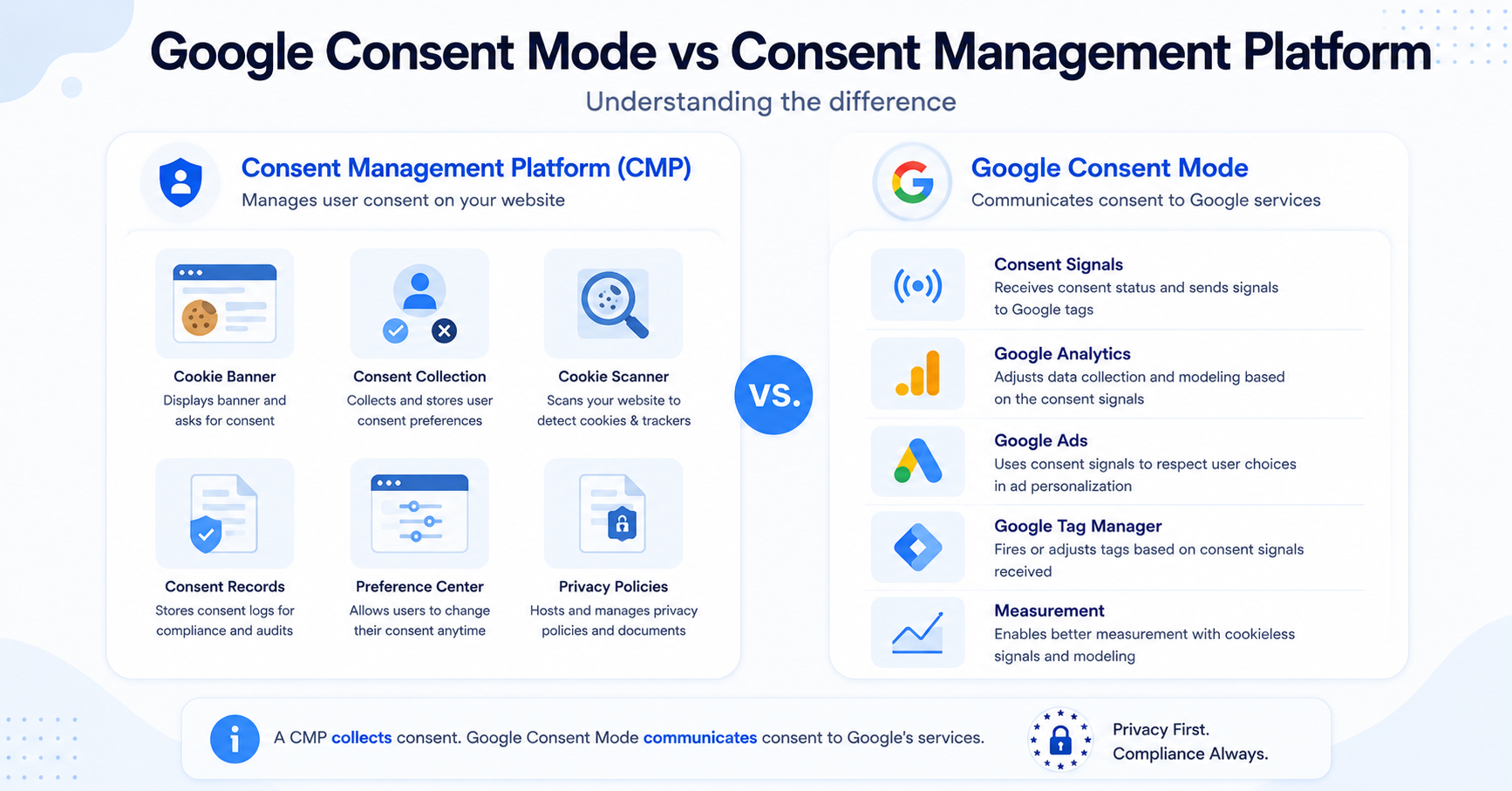
Google Consent Mode and a Consent Management Platform are also different tools.
A CMP manages the wider consent process. Google Consent Mode only communicates consent information to supported Google services.
| Consent Management Platform | Google Consent Mode |
|---|---|
| Displays the cookie banner | Does not display a cookie banner |
| Collects visitor consent | Receives consent signals |
| Stores consent choices | Adjusts supported Google tags |
| May control many third-party scripts | Mainly applies to Google’s supported services |
| May include scanning, policies, and consent logs | Does not provide a full compliance platform |
In simple terms, the CMP collects the visitor’s decision. Google Consent Mode passes that decision to Google Analytics, Google Ads, and other supported tags.
Not sure what a CMP does? Read our complete guide to Consent Management Platforms before choosing a cookie consent tool.
Do Small Websites Need Google Consent Mode?
Not every small website needs Google Consent Mode.
It is mainly relevant when a website uses Google tools that need to respond to visitor consent choices.
You may benefit from Google Consent Mode if your website uses:
- Google Analytics 4
- Google Ads conversion tracking
- Google Ads remarketing
- Google Tag Manager
- Floodlight tags
- Other supported Google advertising or measurement tools
If your website does not use Google Analytics, Google Ads, or related Google tags, Consent Mode may not provide any practical benefit.
However, even a small blog or business website may use GA4 or Google Ads. In that case, Google Consent Mode can help connect those services with the choices collected through the cookie banner.
A small online shop uses Google Analytics to measure visits and Google Ads to track purchases. Its CMP collects the visitor’s cookie choices, while Google Consent Mode communicates those choices to the analytics and advertising tags.
How Do You Set Up Google Consent Mode?
There are several ways to implement Google Consent Mode.
The easiest option for many website owners is to use a Consent Management Platform that already supports Google Consent Mode.
A typical setup includes the following steps:
- Install a compatible cookie banner or CMP.
- Enable Google Consent Mode inside the CMP settings.
- Connect the CMP with Google Tag Manager or your Google tags.
- Set the default consent status before Google tags run.
- Send updated consent settings after the visitor makes a choice.
- Test the implementation to confirm that the correct signals are being sent.
Google also allows developers to implement Consent Mode directly using the Google tag or Google Tag Manager. However, this usually requires more technical knowledge.
For a beginner-friendly setup, choose a CMP with built-in Google Consent Mode support. This is usually easier than creating and maintaining a custom implementation.
How Can You Test Google Consent Mode?
After setting it up, you should check whether Consent Mode is working correctly.
You can test:
- The default consent state before making a choice
- What happens after accepting all cookies
- What happens after rejecting non-essential cookies
- Whether preferences update correctly
- Whether Google tags respect each consent category
Google recommends using Google Tag Assistant to verify a website’s Consent Mode implementation.
You should also test your cookie banner in a private browser window and clear stored consent choices between tests.
Do not assume Consent Mode is working simply because the banner appears. The banner, CMP, consent signals, and Google tags must all be connected correctly.
Does Google Consent Mode Make a Website GDPR Compliant?
No. Google Consent Mode does not automatically make a website GDPR compliant.
It is a technical feature that helps Google tags respond to visitor consent choices. It does not create your privacy policy, identify every cookie, decide which legal rules apply, or guarantee that your banner is configured correctly.
A complete cookie consent setup may also require:
- A clear cookie banner
- Accurate cookie categories
- Prior blocking of non-essential technologies where required
- A cookie policy
- A way for visitors to withdraw or change consent
- Correct settings for non-Google scripts and services
Google Consent Mode is only one part of a website’s privacy setup. CookieBannerGuide provides general educational information and not legal advice.
Final Thoughts
Google Consent Mode helps Google tags adjust their behaviour based on the choices visitors make through your cookie banner or CMP.
It can connect consent settings with Google Analytics, Google Ads, and other supported services. However, it does not display a banner, collect consent, or replace a complete Consent Management Platform.
For most non-technical website owners, the simplest option is to choose a CMP with built-in Google Consent Mode support and then test the setup carefully.
Next Step: Choose the Right Consent Solution
Now that you understand how Google Consent Mode works, the next step is to choose a consent solution that can collect visitor choices and connect them with the tools used by your website.

Frequently Asked Questions
Common questions about this topic
Google Consent Mode communicates visitor consent choices to supported Google tags. It helps services such as Google Analytics and Google Ads adjust how they use cookies and collect measurement data.
Google Consent Mode is not automatically required for every website. Its importance depends on which Google advertising and analytics services you use, where your visitors are located, and which Google requirements apply to your account.
Google does not charge a separate fee for Consent Mode. However, you may need a paid CMP plan or technical support to implement and manage it correctly.
Yes, developers can connect Consent Mode to a custom consent solution. For most website owners, using a compatible CMP is easier because it collects consent and sends the required updates automatically.
Basic Consent Mode blocks Google tags until consent is granted. Advanced Consent Mode can load Google tags with consent denied by default and may send limited cookieless signals when the visitor does not consent.