A cookie banner is the part visitors see, but a Consent Management Platform handles the choices behind it. This guide explains how the two work together, which CMP features matter, and whether your website needs one.
A Consent Management Platform (CMP) is software that collects, stores and applies visitors’ privacy choices to cookies and tracking technologies.
Depending on its features and configuration, it can block tracking before consent, record consent decisions and let visitors change their preferences later. Installing a CMP alone does not guarantee that every tracker follows those choices.
What Is a Consent Management Platform (CMP)?
A Consent Management Platform is software that helps a website manage how visitor consent is collected and used.
In simple terms, a CMP connects the visible cookie banner with the cookies, analytics tools, advertising services, and other tracking technologies running on your website.
When someone visits your website, the CMP may:
- Display a cookie consent banner
- Explain which cookie categories the website uses
- Allow the visitor to accept or reject different categories
- Block non-essential cookies before permission is given
- Store the visitor’s consent choice
- Allow the visitor to change or withdraw consent later
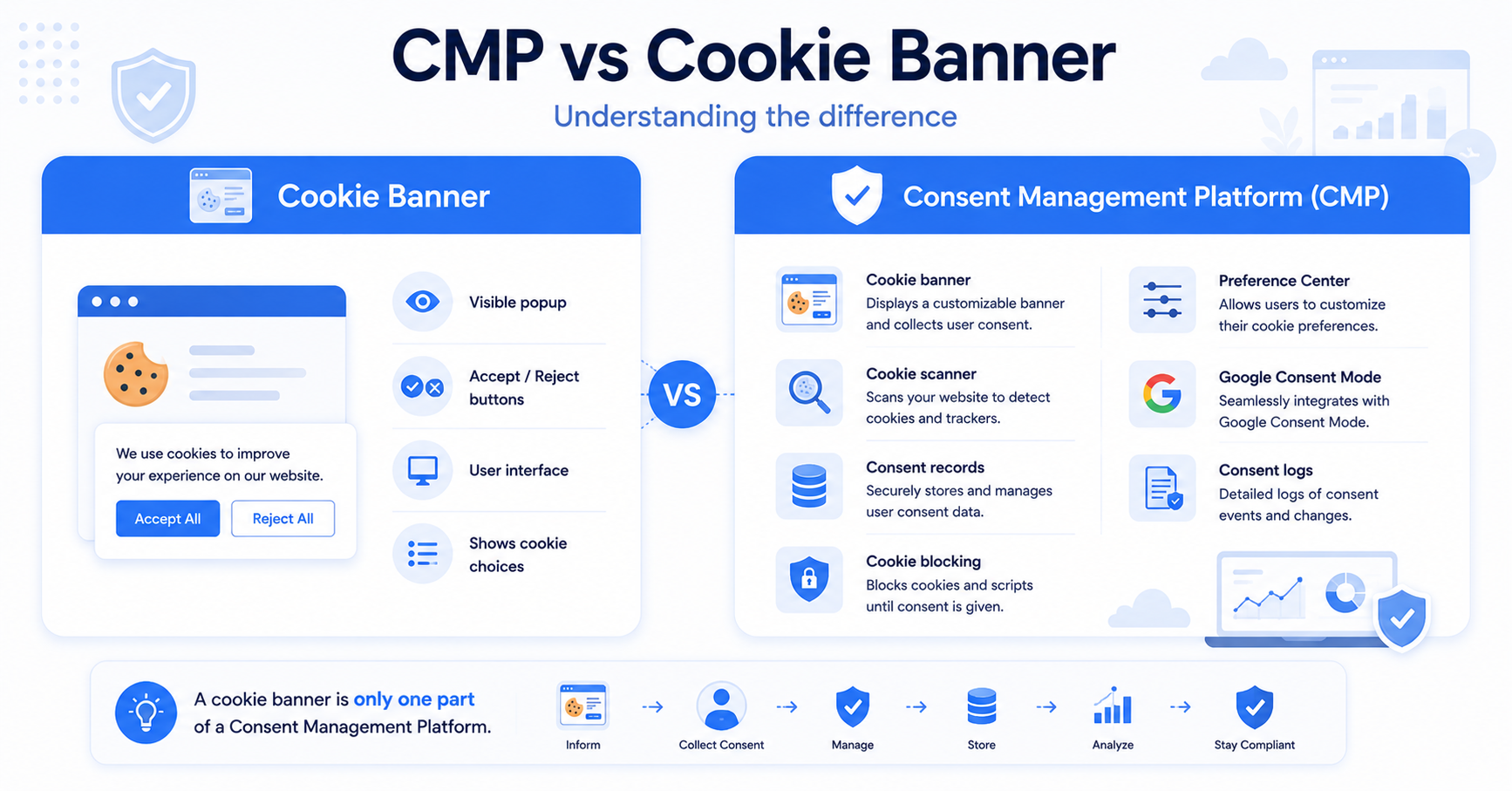
The cookie banner is therefore only one part of a CMP. The CMP is the complete system that manages what happens before and after the visitor makes a choice.
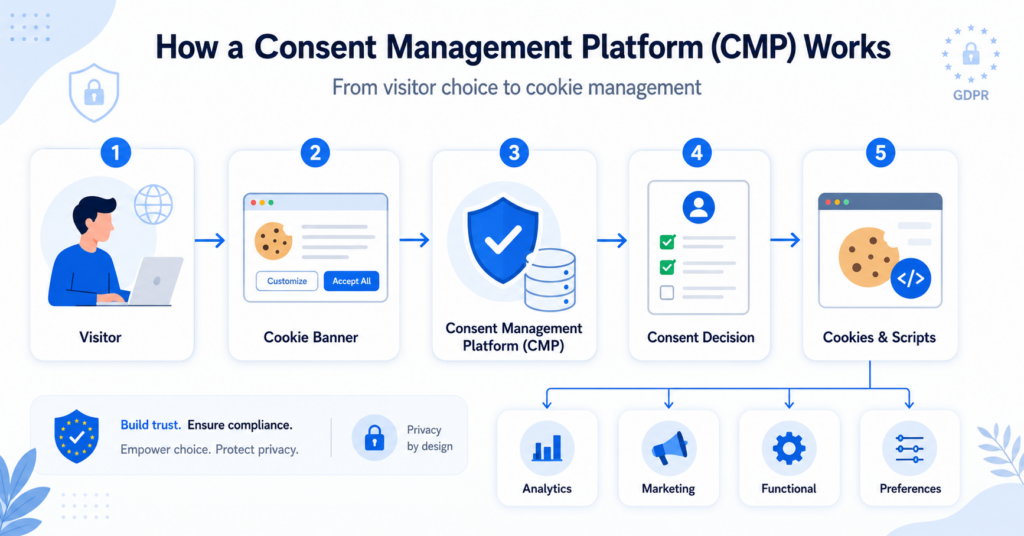
How Does a Consent Management Platform Work?
A CMP normally works in several connected steps.
1. The visitor opens your website
When a person visits your website, the CMP checks whether that visitor has already made a consent choice.
If no choice has been saved, the website displays a cookie banner or consent notice.
2. The cookie banner explains the choices
The banner tells the visitor that the website uses cookies or similar technologies.
Depending on the setup, the visitor may be able to:
- Accept all cookies
- Reject non-essential cookies
- Choose individual cookie categories
- Open a detailed preference centre
3. The visitor makes a decision
The visitor’s selection is sent to the CMP. For example, the visitor might allow functional and analytics cookies but reject marketing cookies.
4. The CMP controls cookies and scripts
Based on the visitor’s choice, the CMP tells the website which tools may run.
For example, it may allow an analytics script after analytics consent is given. If consent is rejected, the relevant script should remain blocked or behave according to the selected consent settings.
5. The consent choice is stored
The CMP records the visitor’s decision so the banner does not need to appear on every page.
Many platforms also create consent logs that can help website owners demonstrate when and how consent was collected.
Why Is a CMP Important?
A CMP helps turn a basic cookie notice into a working consent system.
This matters because simply telling visitors that your website uses cookies is not always enough. For non-essential cookies, visitors may need a genuine opportunity to accept or reject their use before those cookies are activated.
A CMP can help with several practical tasks:
- Giving visitors clear cookie choices
- Preventing some tracking tools from loading too early
- Recording consent decisions
- Managing consent across different pages
- Allowing visitors to update their preferences
- Connecting consent choices with analytics and advertising tools
Displaying a banner does not automatically make a website compliant. The banner must be connected to the cookies and tracking tools used by the website. Non-essential technologies should not be activated before valid consent where consent is required.
The UK Information Commissioner’s Office explains that users should be able to enable or disable non-essential cookies and that consent should involve a clear positive action. You can read its official guidance on cookies and similar technologies.
What Features Does a CMP Usually Include?
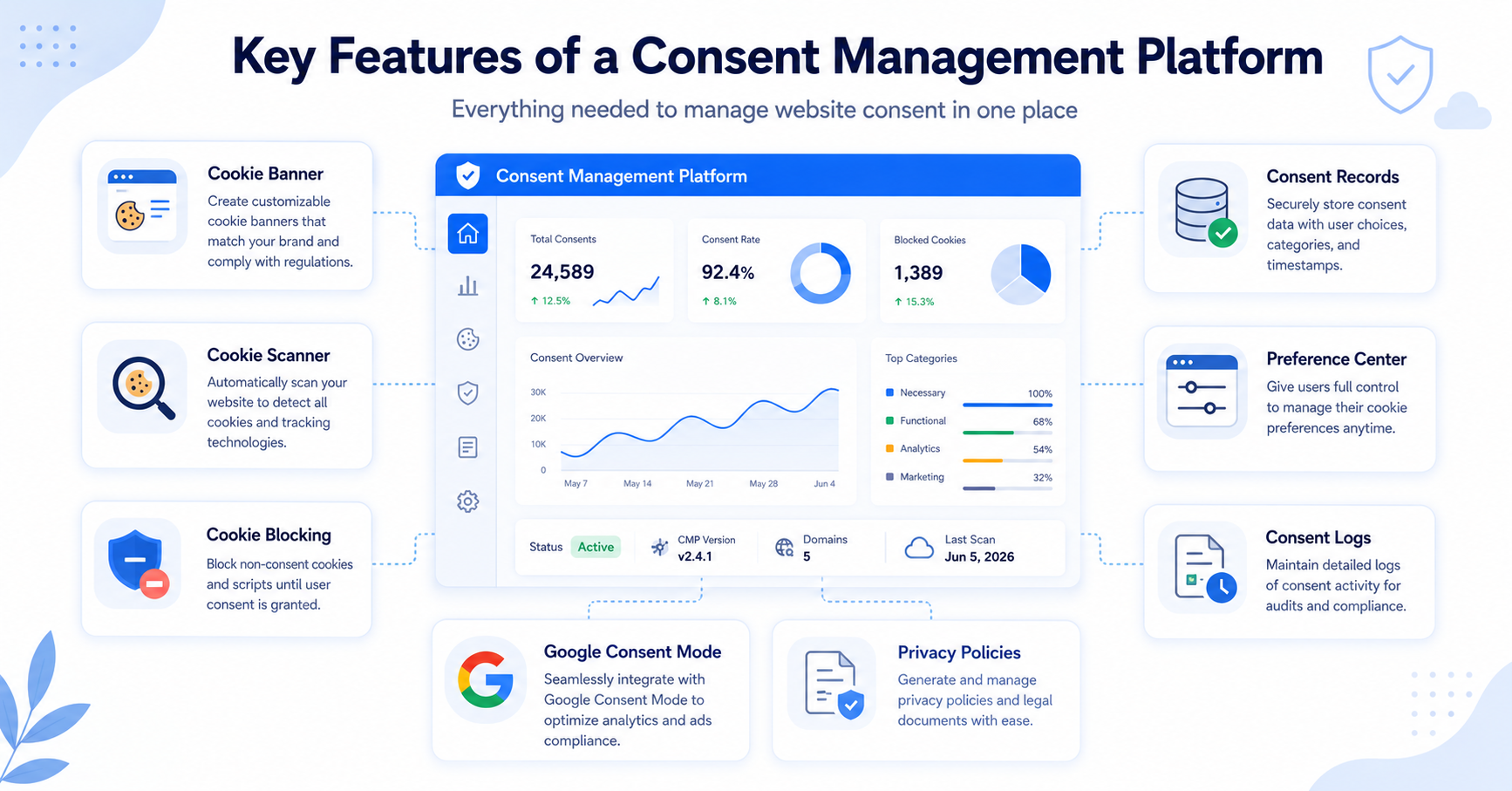
Features vary between providers, but most Consent Management Platforms include several of the following tools.
| Feature | What it does |
|---|---|
| Cookie banner | Displays consent choices to website visitors. |
| Cookie scanner | Checks the website for cookies and tracking technologies. |
| Automatic cookie blocking | Helps prevent selected scripts from running before consent. |
| Preference centre | Allows visitors to choose and later change cookie categories. |
| Consent records | Stores information about consent decisions. |
| Policy generator | Some platforms help create a cookie policy or privacy policy. |
| Geo-targeting | Shows different consent options based on a visitor’s location. |
| Integrations | Connects consent choices with tools such as Google Analytics or Google Tag Manager. |
CMP vs Cookie Banner: What Is the Difference?
A cookie banner and a CMP are connected, but they are not exactly the same.
The cookie banner is the visible message that appears on the website. A CMP is the system that displays the banner and manages what happens after a visitor makes a choice.
| Cookie Banner | Consent Management Platform |
|---|---|
| Visible notice shown to visitors | Complete consent management system |
| Explains that cookies are used | Connects visitor choices with cookies and scripts |
| Contains accept, reject, or settings buttons | Stores and manages consent choices |
| Front-end interface | Includes front-end and background functions |
| May be only a visual notice | May scan, categorise, block, and document cookies |
A banner that is not connected correctly to the website’s scripts may continue to load analytics or marketing cookies before a visitor has agreed to them.
That is why it is important to test what your banner actually does. Our Cookie Scanner can help you identify cookies that may be present on your website.
Do Small Websites Need a CMP?
A small website does not automatically need a complicated enterprise platform. However, website size is not the only factor that matters.
You should also consider which technologies your website uses.
A CMP may be useful when your website uses:
- Google Analytics or another analytics platform
- Google Ads conversion tracking
- Meta Pixel or other advertising pixels
- Embedded videos or maps
- Personalisation tools
- Affiliate tracking
- Retargeting or behavioural advertising
A simple website using only essential cookies may have fewer consent requirements. A small blog using analytics, advertising, and embedded third-party content can have more complex needs.
Imagine a small WordPress blog that uses Google Analytics and displays YouTube videos. Its CMP can show a banner, keep analytics disabled until the visitor gives permission, and prevent the video service from setting optional cookies before the correct choice is made.
For a more detailed explanation, see our guide: Do Small Websites Need a Cookie Banner?
Can a CMP Work with Google Consent Mode?
Many CMPs can connect with Google Consent Mode.
Consent Mode allows Google tags to adjust their behaviour based on the consent choices made by a website visitor. The CMP collects the visitor’s choice and communicates the relevant consent status to supported Google tools.
For example, consent settings may tell Google services whether the visitor has allowed analytics storage or advertising-related storage.
However, Google Consent Mode is not a replacement for a cookie banner or CMP. It works alongside the consent system used by your website.
If you use Google Analytics, Google Ads, or Google Tag Manager, check whether your chosen CMP offers a direct Consent Mode integration. This can make the technical setup easier and reduce configuration mistakes.
Examples of Consent Management Platforms
There are many CMPs designed for different website platforms, budgets, and compliance needs.
Popular examples include:
- CookieYes – A beginner-friendly option with cookie scanning, banner customisation, and a free plan.
- Cookiebot – A widely used platform with automatic scanning and consent management features.
- Complianz – A popular WordPress-focused solution with region-based consent options.
- Termly – Combines consent management with policy generation tools.
- CookieHub – Offers cookie scanning, consent banners, and Google Consent Mode support.
- iubenda – Provides consent tools together with privacy and legal document solutions.
These platforms do not all work in exactly the same way. Some are designed for beginners, while others are better suited to larger websites, agencies, publishers, or businesses operating in several regions.
Not sure which platform is right for your website?
Compare features, pricing models, and use cases in our guide to the best cookie consent tools →
How to Choose the Right CMP
The best CMP depends on your website and the tools connected to it.
Before choosing a platform, consider the following questions:
Check these points before choosing a Consent Management Platform:
- Does it work with your website platform?
- Can it scan and categorise your cookies?
- Does it block non-essential scripts before consent?
- Can visitors reject cookies as easily as they accept them?
- Does it store consent records?
- Does it support the countries where your visitors are located?
- Can it connect with your analytics and advertising tools?
- Does the price fit your traffic and number of websites?
You should also check how easy the platform is to install and maintain. The most advanced platform is not always the best choice if it is too complicated for you to configure correctly.
Is a CMP Required by GDPR?
The GDPR does not simply say that every website must purchase a commercial CMP.
What matters is whether your website collects and manages consent correctly when consent is required. You may use a commercial CMP, a suitable plugin, or a properly developed custom system.
However, a CMP can make the process easier by combining the banner, cookie controls, consent storage, and preference settings in one system.
Remember that cookie requirements can also involve other rules, including national laws that implement the ePrivacy Directive. The exact requirements can depend on your location, your visitors, and the technologies used by your website.
CookieBannerGuide provides general educational information, not legal advice. For questions about your website’s specific legal obligations, consider speaking with a qualified privacy professional.
Final Thoughts
A Consent Management Platform is much more than a cookie popup. It is the system that connects a visitor’s privacy choices with the cookies, scripts, analytics tools, and advertising services used by a website.
A properly configured CMP can help you display clear choices, block selected technologies before consent, store consent records, and allow visitors to update their preferences.
Next Step: Choose the Right CMP
Now that you understand what a Consent Management Platform does, the next step is to decide which type of cookie consent solution fits your website.

Frequently Asked Questions
Common questions about this topic
CMP stands for Consent Management Platform. It is a system that helps websites collect, store, and manage visitor consent for cookies, tracking tools, and certain uses of personal data.
No. A cookie banner is the visible notice shown to visitors. A CMP is the wider system that displays the banner, controls cookies and scripts, stores choices, and manages consent preferences.
Not every website needs a complex commercial CMP. The need depends on the cookies, tracking tools, advertising services, and privacy rules that apply to the website.
Yes. Several CMP providers offer free plans for small websites. Check the limits carefully, including pageviews, number of pages, domains, languages, and available compliance features.
No. A CMP is only one part of website privacy compliance. It must be configured correctly, connected to the correct scripts, and supported by accurate privacy and cookie information.