Termly is a privacy compliance platform that combines cookie consent tools with legal policy generators and consent management features.
But how much does Termly cost, and is the Free plan enough for your website?
In this guide, we’ll break down Termly pricing, banner view limits, legal policy allowances, cookie scan frequency, and when it makes sense to upgrade.
Reviewed by: Cookie compliance specialist
5+ years of hands-on experience with GDPR and consent tools
Tested on real websites using WordPress, Shopify, and custom cookie consent setups
Termly pricing is mainly based on the number of websites you manage, monthly consent banner views, legal policy limits, policy edits, and the compliance features included in each plan.
The Free plan may work for a small website with limited traffic. Starter is better for small businesses, while Pro+ is the strongest option for websites that need unlimited banner views, legal policies, and advanced consent features.
Termly Pricing Plans
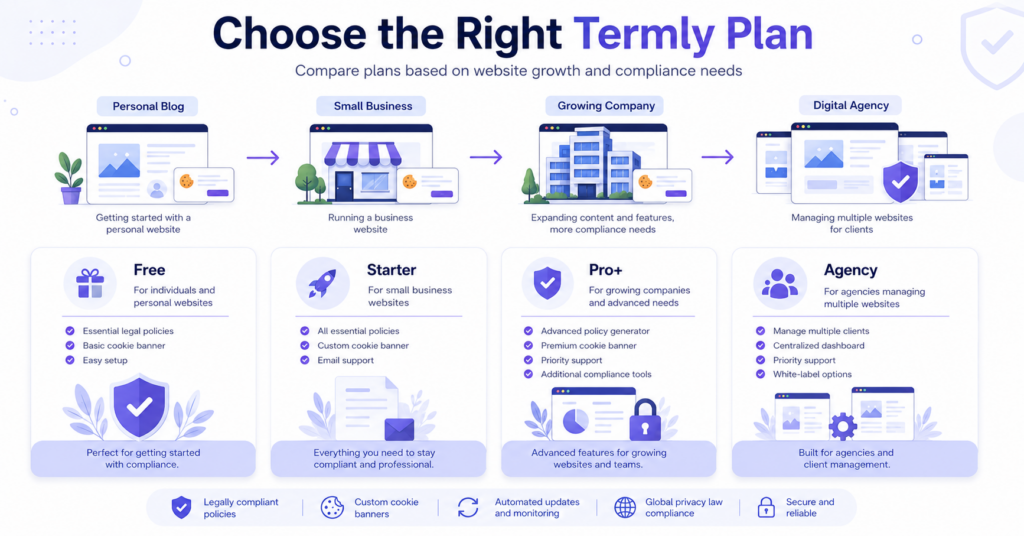
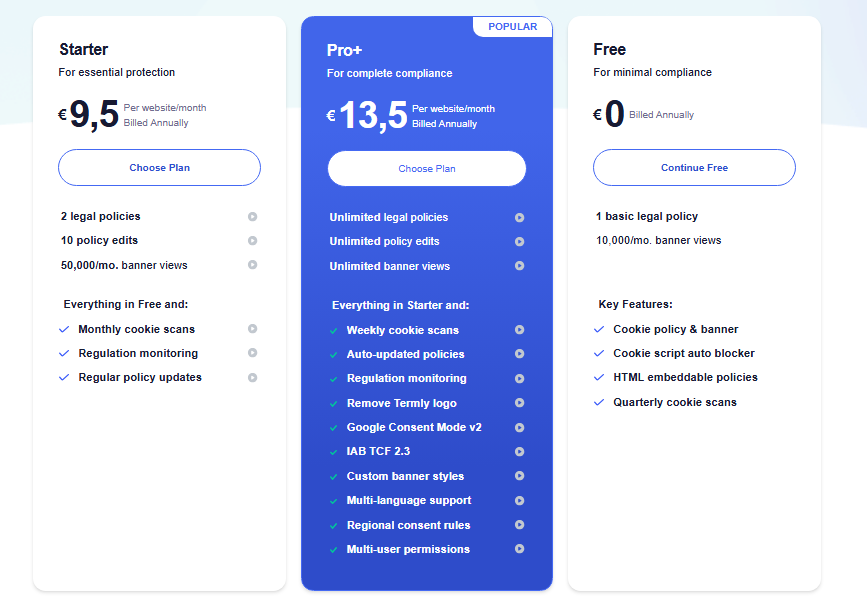
Termly offers three standard plans: Free, Starter, and Pro+. It also has a custom Agency plan for businesses managing multiple websites or reselling privacy services.
The paid prices shown below are per website per month with annual billing. The main differences are monthly banner views, legal policy limits, policy edits, scan frequency, and advanced consent features.
| Plan | Price | Main Limits | Best For |
|---|---|---|---|
| Free | €0 | 1 basic legal policy and 10,000 banner views/month | Small websites testing basic cookie consent |
| Starter | €9.50/website/month | 2 legal policies, 10 policy edits, and 50,000 banner views/month | Small business websites needing regular monitoring |
| Pro+ | €13.50/website/month | Unlimited legal policies, edits, and banner views | Businesses needing complete privacy and consent features |
| Agency | Custom pricing | Custom website licences and account features | Agencies, resellers, and businesses managing many websites |
Because prices, currencies, plan limits, and included features can change over time, it is always a good idea to verify the latest information on the official Termly pricing page.
The euro prices shown here use annual billing. Your total may differ if you choose monthly billing, use another currency, add more website licences, or pay applicable taxes.
How Does Termly Pricing Work?
Termly pricing works around several main factors: the number of websites you manage, monthly banner views, legal policy limits, policy edits, cookie scan frequency, and the advanced consent features included in your plan.
In simple terms, each standard plan includes a licence for one website. If you want to use Termly on several websites, you may need additional licences or an Agency arrangement.
The Free and Starter plans also have monthly consent banner view limits. Pro+ includes unlimited banner views, making it easier for growing or high-traffic websites to avoid usage restrictions.
Termly is also different from tools that only provide a cookie banner. Its paid plans can include legal policy generators, policy updates, regulation monitoring, and broader consent management features.
| Pricing Factor | What It Means | Why It Matters |
|---|---|---|
| Website licences | How many websites use your Termly account | Standard plans include one website, while extra websites may require more licences |
| Banner views | How often the Termly consent script loads on your website | Free and Starter have monthly limits, while Pro+ is unlimited |
| Legal policies | How many generated legal documents your plan includes | Businesses needing several policies may require Starter or Pro+ |
| Policy edits | How many times you can update generated policies | Starter has a limit, while Pro+ allows unlimited edits |
| Cookie scan frequency | How often Termly automatically checks your website for cookies | More frequent scans can help keep your cookie information current |
| Advanced features | Custom styling, languages, regional rules, Google Consent Mode, and reporting tools | These features are mainly available with Pro+ |
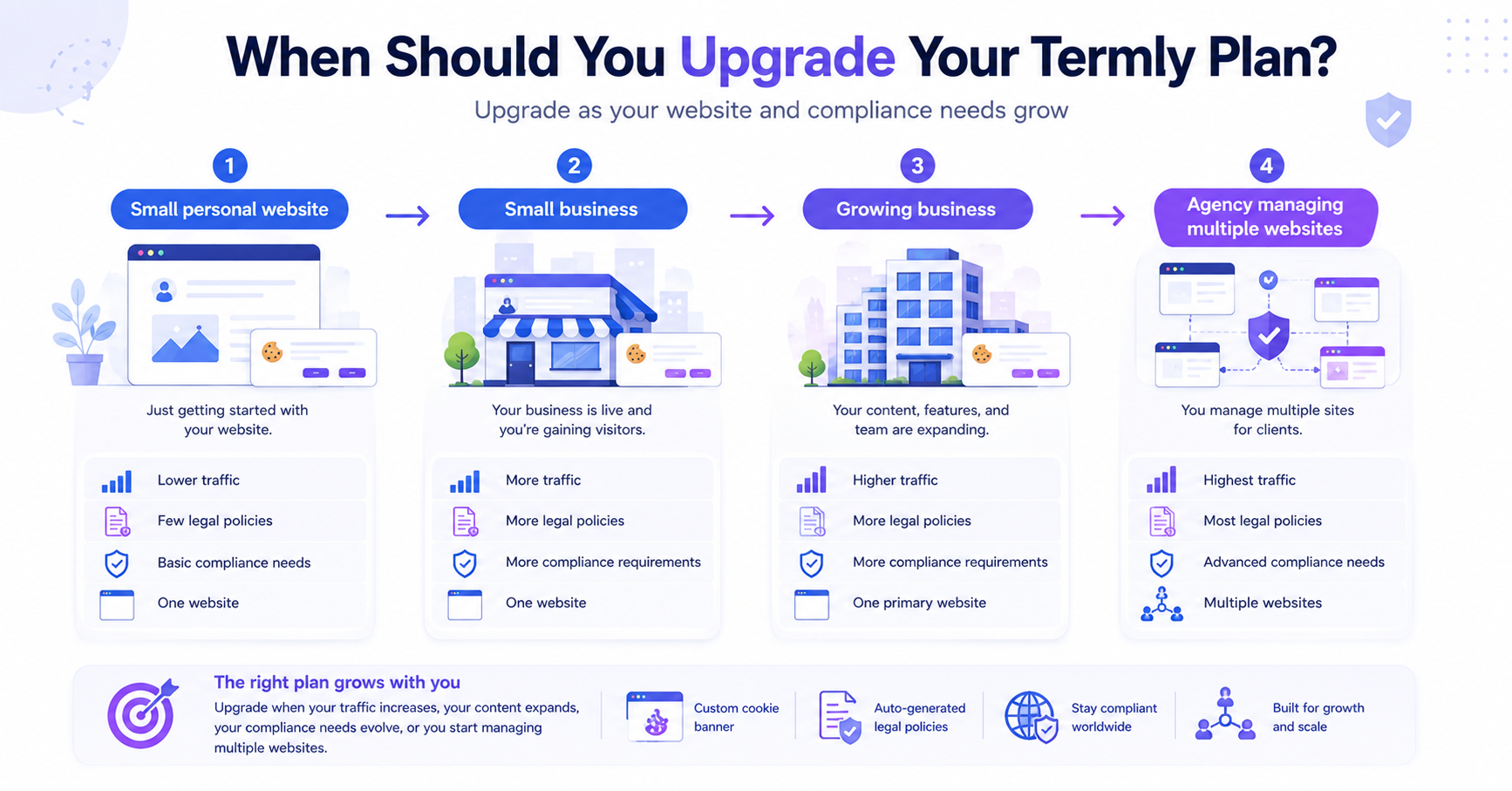
A small personal website with modest traffic and one basic policy may stay within the Termly Free plan.
A small business website needing two legal policies and receiving fewer than 50,000 monthly banner views may fit the Starter plan.
A growing ecommerce or content website that needs unlimited banner views, several legal policies, multilingual support, and regional consent rules will usually fit Pro+ better.
What Are Banner Views in Termly?
Banner views are one of the most important parts of Termly pricing because they determine whether the Free or Starter plan can handle your website traffic.
A banner view is recorded when Termly’s consent script loads and executes on a page. This happens before the cookie banner is visually displayed to the visitor.
This means banner views are not exactly the same as unique visitors. One person can generate several banner views by opening several pages or returning to your website.
Traffic that does not execute JavaScript may not count. However, browsers, automated systems, or sophisticated bots that execute JavaScript may create banner views.
How Can You Check Your Monthly Termly Banner Views?
The most accurate method is to check your Termly dashboard. Termly displays consent banner usage as a graph, allowing you to see how many banner views your website records each month.
You can also use Google Analytics, Plausible, Fathom, or your hosting statistics to estimate your website traffic. However, those tools may show different numbers because pageviews, visitors, sessions, and Termly banner views are not measured in exactly the same way.
Do not choose a Termly plan using unique visitor numbers alone. Check the banner view report in your Termly dashboard because one visitor can open several pages and generate more than one banner view.
What Do You Get With the Termly Free Plan?
The Termly Free plan is designed for small websites that need a basic cookie consent setup and one legal policy.
It can be a useful starting point for personal websites, small blogs, and early-stage projects. However, its banner view limit and policy restrictions may become unsuitable as a website grows.
- 1 basic legal policy
- 10,000 monthly banner views
- Cookie policy and consent banner
- Cookie script auto blocker
- HTML-embeddable policies
- Quarterly cookie scans
- 1 included website
- Basic consent management features
If you run a small blog that stays below 10,000 monthly banner views and only needs one basic legal policy, the Free plan may be enough.
If you need several legal policies, more frequent scans, or your banner usage approaches the monthly limit, you should compare Starter and Pro+.
Termly Free vs Starter
The main reason to upgrade from Free to Starter is not only traffic. Starter also includes more legal policy capacity, policy edits, monthly scans, regulation monitoring, and regular policy updates.
Starter may be suitable for a small business website that wants more than a basic cookie banner but does not need all the advanced features included with Pro+.
| Feature | Free | Starter |
|---|---|---|
| Monthly price | €0 | €9.50/website/month |
| Included websites | 1 | 1 |
| Legal policies | 1 basic policy | 2 policies |
| Policy edits | Not included as a paid editing allowance | 10 edits |
| Monthly banner views | 10,000 | 50,000 |
| Cookie scans | Quarterly | Monthly |
| Regulation monitoring | Limited | Included |
| Best for | Personal websites and small blogs | Small business websites |
When Do You Need a Paid Termly Plan?
You probably need a paid Termly plan when the Free plan’s banner view or legal policy limits no longer match your website.
A paid plan also makes more sense if your website represents a business, receives regular traffic, or needs more frequent cookie scans and policy updates.
Use this checklist to decide if the Free plan is still enough for your website.
- Your website is approaching 10,000 monthly banner views.
- You need more than one basic legal policy.
- You need to edit and update your policies regularly.
- You want monthly or weekly cookie scans.
- You need regulation monitoring and policy updates.
- You want custom consent banner styles.
- You need multilingual support or regional consent rules.
- You want to remove the Termly logo.
- You need Google Consent Mode v2 or IAB TCF 2.3 support.
Termly Starter vs Pro+
Starter is designed for small business websites that need more than the Free plan but do not yet require unlimited policies or advanced consent features.
Pro+ removes nearly all important usage limits by offering unlimited legal policies, unlimited policy edits, unlimited monthly banner views, weekly cookie scans, Google Consent Mode v2, multilingual support, custom banner styling, and other advanced compliance features.
| Feature | Starter | Pro+ |
|---|---|---|
| Monthly price | €9.50/website/month | €13.50/website/month |
| Included websites | 1 | 1 |
| Legal policies | 2 | Unlimited |
| Policy edits | 10 | Unlimited |
| Monthly banner views | 50,000 | Unlimited |
| Cookie scans | Monthly | Weekly |
| Regulation monitoring | Included | Included |
| Auto-updated policies | Included | Included |
| Remove Termly logo | No | Yes |
| Google Consent Mode v2 | No | Yes |
| IAB TCF 2.3 support | No | Yes |
| Custom banner styles | No | Yes |
| Multi-language support | No | Yes |
| Regional consent rules | No | Yes |
| Multi-user permissions | No | Yes |
| Best for | Small business websites | Growing businesses and complete privacy setups |
If the price difference between Starter and Pro+ fits your budget, compare your long-term needs rather than today’s usage. Many growing websites eventually need unlimited banner views, additional legal policies, multilingual support, or Google Consent Mode, making Pro+ the better long-term value.
Who Is the Termly Agency Plan For?
The Agency plan is designed for agencies, resellers, consultants, and businesses managing several websites.
It includes Pro+ features along with multi-domain management, multi-user permissions, onboarding, bulk import options, compliance support, and potential bulk licence discounts.
Agency pricing is customized. You need to contact Termly for a quote based on the number of websites and the account features your organization requires.
Is Termly Pricing Worth It?
Termly pricing can be worth it if you want cookie consent management and legal policy generators inside one platform.
It may cost more than a basic cookie banner plugin, but the paid plans also include privacy policies, monitoring, updates, automatic scans, and broader compliance tools.
Pro+ may offer the strongest value for businesses that need several legal policies, unlimited banner views, multilingual support, regional consent settings, Google Consent Mode v2, and custom banner styling.
Starter may be sufficient for a smaller business that stays below its banner view limit and only needs two policies. However, the relatively small price difference means growing websites should compare Pro+ carefully before choosing Starter.
For a complete breakdown of usability, consent features, policy tools, and limitations, read our Termly Review.
Pros
- Free plan available for small websites
- Cookie banner and legal policy tools in one platform
- Starter provides a relatively affordable business option
- Pro+ includes unlimited policies, edits, and banner views
- Regular cookie scans and regulation monitoring
- Advanced regional and multilingual consent features in Pro+
Cons
- Free plan is limited to 10,000 monthly banner views
- Starter still has policy, edit, and banner view limits
- Pricing is per website
- Several important consent features require Pro+
- Multiple websites can increase the total cost
Termly Pricing vs Other Cookie Consent Tools
Termly differs from many cookie consent tools because it combines a consent management platform with legal policy generators.
This can provide strong value for a business that needs both cookie consent and privacy documents. A website that only needs a simple banner may find a more focused tool or WordPress plugin cheaper.
If you are still deciding between providers, compare the best cookie consent tools before making a final decision.
| Tool | Best For | Free Plan | Pricing Style | Compliance Focus |
|---|---|---|---|---|
| CookieYes | Beginners and small websites | Yes | Domains, pageviews, and scan limits | Beginner-friendly consent setup |
| Cookiebot | Stronger GDPR control | Yes | Domains and subpages | GDPR, ePrivacy, and advanced consent control |
| Termly | Cookie consent and legal policies | Yes | Websites, banner views, policies, and features | Consent management and privacy documents |
| Complianz | WordPress users | Yes | Annual licences based on website count | WordPress-focused privacy and consent tools |
| CookieScript | Multiple websites and scalable scan limits | Yes | Domains, scan limits, and features | Flexible multi-platform cookie consent |
| CookieHub | Websites with growing traffic | Yes | Monthly sessions, scans, and features | Global consent management and Google integrations |
Want to compare Termly’s features before looking only at price?
Should You Choose Termly?
Termly is a strong choice if you want a cookie consent banner, legal policy generators, policy monitoring, and broader privacy tools in one account.
It may not be the cheapest choice if you only need a simple banner for one small website. In that case, compare CookieYes, Cookiebot, or a WordPress-focused solution before deciding.
Choose Termly Free if you have a small website, modest banner usage, and only need one basic legal policy.
Choose Starter if you run a small business, need two policies, and expect fewer than 50,000 monthly banner views.
Choose Pro+ if you need unlimited banner views, unlimited legal policies, regular updates, multilingual support, regional consent rules, or advanced banner controls.
Ask about Agency pricing if you manage many websites or provide privacy services to clients.
Final Verdict: Is Termly Pricing Fair?
Termly pricing is reasonable for businesses that need more than a basic cookie banner. The combination of consent management, legal policies, monitoring, and automatic updates can make the paid plans valuable.
The Free plan works as a useful starting point, while Pro+ appears to offer the strongest long-term value for growing businesses. Starter is most suitable when your needs remain clearly within its policy and banner view limits.
Next Step: Read the Full Termly Review
Before choosing a Termly plan, read the full review to compare its consent features, legal policy tools, ease of use, and limitations.

Frequently Asked Questions
Common questions about this topic
Yes. Termly offers a Free plan with one basic legal policy, a cookie banner, quarterly cookie scans, and up to 10,000 monthly banner views.
Based on the euro prices shown with annual billing, Starter costs €9.50 per website per month and Pro+ costs €13.50 per website per month. Agency pricing is customized.
Termly pricing is based mainly on website licences, monthly banner views, legal policy allowances, policy edits, scan frequency, and included consent features.
A banner view is counted when Termly’s consent script loads and executes on a page. It is not the same as a unique visitor because one visitor can generate several banner views.
Log in to your Termly dashboard and check the banner view report. It displays your usage over time and provides a more reliable number than estimating from visitors alone.
The Free plan may be enough for a small website with fewer than 10,000 monthly banner views and a need for only one basic legal policy.
Starter may be enough for a small business with limited policy needs. Pro+ is better for growing websites that need unlimited banner views, policies, edits, and advanced consent features.