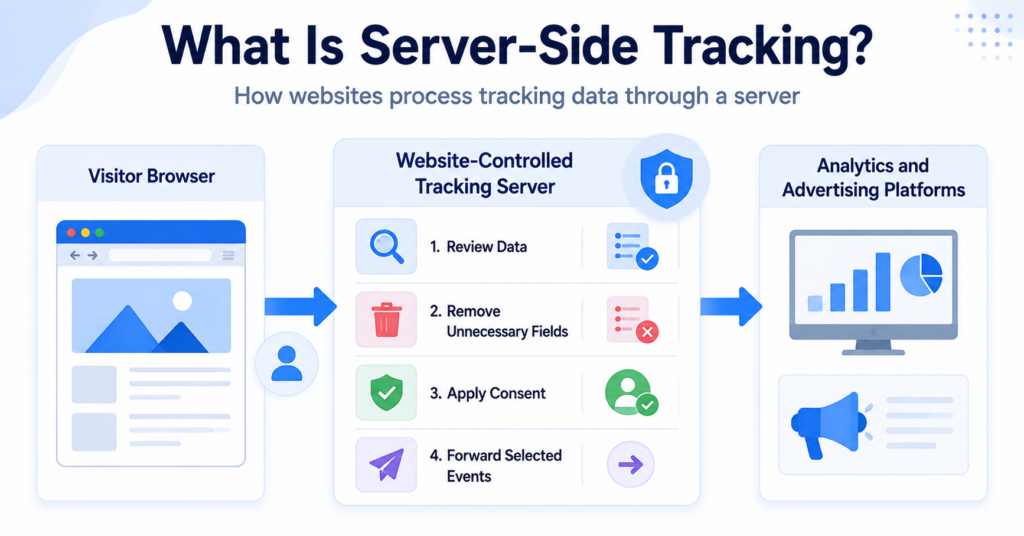
Server-side tracking is a method of collecting and processing website data through a server instead of sending all information directly from a visitor’s browser to external services.
The visitor’s browser may still collect and send an initial event. However, the event first reaches a server controlled by the website owner, where the data can be reviewed, adjusted, and forwarded to selected analytics or advertising platforms.
In this guide, you’ll learn what server-side tracking is, how it works, how it differs from client-side tracking, and why using a server does not automatically remove privacy or consent requirements.
Server-side tracking sends website events to a website-controlled server before forwarding selected data to analytics or advertising services. It can improve data control and website performance, but it does not automatically make tracking private, cookieless, or exempt from consent requirements.
What Is Server-Side Tracking?
Server-side tracking is a tracking setup where data is processed through a server environment before it is sent to external measurement or marketing platforms.
With traditional client-side tracking, a visitor’s browser may communicate directly with several external providers. Each analytics tool, advertising service, or tracking tag can create its own request from the browser.
With server-side tracking, the process normally includes an additional step:
- The visitor performs an action on the website.
- The browser or website sends an event to a server endpoint.
- The server receives and processes the event.
- The server decides which information should be forwarded.
- Selected data is sent to analytics, advertising, or other connected platforms.
This server may be hosted by the website owner, a cloud platform, a tag-management provider, or another technical service.
The term server-side tracking can describe several different implementations. One common example is server-side tagging, where a server container processes events before sending them to measurement platforms.
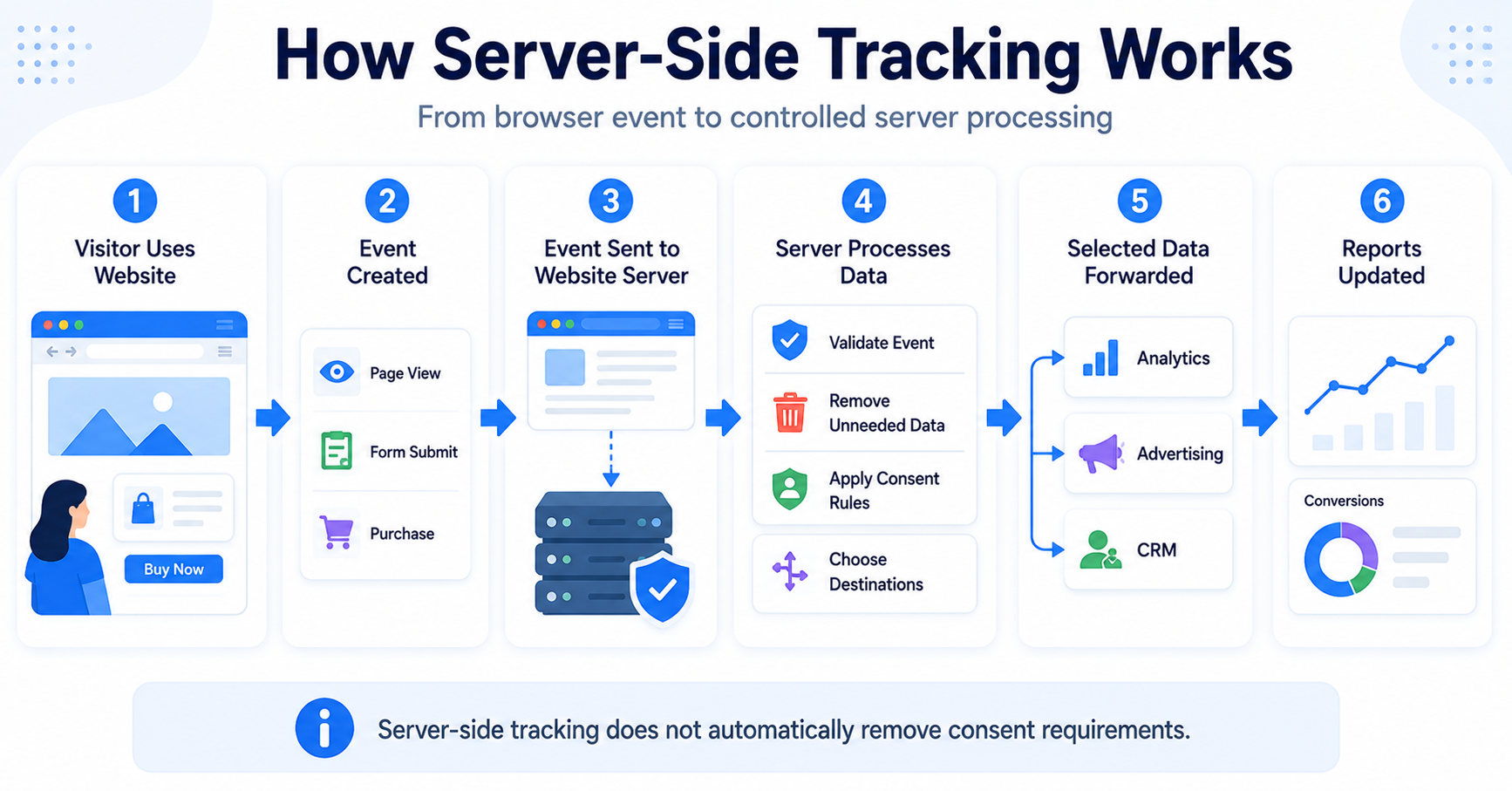
A customer completes a purchase. The website sends the purchase event to its tracking server. The server removes unnecessary fields and forwards selected purchase data to the website’s analytics and advertising platforms.
How Does Server-Side Tracking Work?
Server-side tracking creates a controlled layer between the visitor’s browser and the external platforms receiving tracking data.
A simplified workflow looks like this:
- A visitor opens a website.
- The visitor views a page, submits a form, or completes another action.
- The website creates an event containing relevant information.
- The event is sent to a website-controlled server endpoint.
- The server validates and processes the event.
- The server forwards approved data to selected providers.
- The event appears in analytics or advertising reports.
Step 1: A visitor performs an action
The process begins with an event such as:
- opening a webpage;
- viewing a product;
- adding an item to a cart;
- submitting a form;
- creating an account;
- completing a purchase.
The website needs a way to detect the action and create an event. This may still involve browser scripts, website code, an application, or information already available to the server.
Step 2: The event reaches the tracking server
Instead of sending the event directly to every external provider, the website sends it to a server endpoint.
The endpoint may use a first-party subdomain or another address connected to the website’s tracking setup.
Step 3: The server processes the data
The server can review the event before forwarding it.
Depending on the implementation, it may:
- validate the event structure;
- remove unnecessary fields;
- rename or organise values;
- add information available to the server;
- apply consent rules;
- block unwanted destinations;
- send different data to different providers.
Step 4: Selected data is forwarded
After processing, the server may send the event to one or more connected platforms.
These may include:
- analytics platforms;
- advertising platforms;
- customer relationship systems;
- conversion measurement services;
- internal reporting tools;
- data warehouses.
Step 5: The event appears in reports
The receiving platform processes the event and adds it to its reports, audiences, or campaign measurement systems.
The exact result depends on which information was included and how the receiving platform interprets it.
Server-side tracking does not necessarily mean that all tracking happens without the browser. Many setups still use browser code to collect the initial event and send it to the server.
What Is Client-Side Tracking?
Client-side tracking runs mainly inside the visitor’s browser or application.
A tracking script may detect an event and send information directly from the browser to an external analytics or advertising platform.
For example, one webpage may load separate browser tags for:
- website analytics;
- advertising conversions;
- remarketing;
- social media measurement;
- heatmaps;
- other marketing services.
Each provider may require its own script and network request.
Client-side tracking is generally easier to set up, but it gives the browser and external scripts a larger role in collecting and sending information.
Server-Side Tracking vs Client-Side Tracking
The main difference is where the tracking logic and provider communication take place.
| Feature | Server-Side Tracking | Client-Side Tracking |
|---|---|---|
| Processing location | Website-controlled server environment | Visitor’s browser or application |
| External provider requests | Often sent from the server | Usually sent directly from the browser |
| Data control | Can review data before forwarding it | Depends more heavily on each browser tag |
| Browser workload | Can reduce some browser scripts and requests | May require several browser tags and requests |
| Setup difficulty | More complex | Usually simpler |
| Hosting cost | May require paid server infrastructure | Often has no separate tracking-server cost |
| Consent requirements | Depend on the purpose and data use | Depend on the purpose and data use |
The next article in this series compares both approaches in more detail, including their costs, advantages, limitations, and practical use cases.
Why Do Websites Use Server-Side Tracking?
Websites may introduce server-side tracking for several reasons.
More control over outgoing data
A server can act as a controlled layer between visitors and external providers.
Website owners may be able to decide:
- which events are forwarded;
- which providers receive each event;
- which fields are removed;
- which values are changed or added;
- how consent choices affect data forwarding.
This can provide more control than allowing every browser tag to send its own data directly.
Reduced browser workload
A client-side setup may load several external scripts and create several similar network requests.
Moving some processing and provider communication to a server may reduce the amount of tracking work performed in the browser.
However, the performance improvement depends on the implementation. A poorly configured server-side setup can still use unnecessary browser scripts.
Improved data consistency
The server may standardise events before sending them to different platforms.
For example, the same purchase event can be processed once and then adapted for several destinations. This may reduce differences between separate browser tags.
Greater control over external providers
Instead of allowing each external provider to receive browser data directly, the website can choose what the server forwards.
This does not automatically guarantee good privacy practices, but it can create a better technical foundation for data minimisation.
Support for first-party data strategies
Server-side tracking can help businesses organise and use data collected through their own websites, accounts, purchases, and customer interactions.
It may also reduce dependence on some third-party browser technologies, although it does not necessarily eliminate them.
Advantages of Server-Side Tracking
Better control over shared data
The server can inspect and adjust events before external platforms receive them.
This may help prevent unnecessary values from being forwarded when the setup is carefully designed.
Potential performance improvements
Moving some tags and network requests away from the browser can reduce client-side processing.
This may improve page performance, especially on websites that currently load many third-party tracking scripts.
Centralised event management
Events can be processed in one server environment before they are sent to several destinations.
This can make tracking logic more consistent and easier to manage at scale.
More reliable event delivery
Some browser requests can be blocked by extensions, browser restrictions, unstable connections, or page closures.
A server-based system may improve the reliability of certain events, particularly when the relevant information is already available to the website’s own server.
However, server-side tracking cannot recover information that was never collected or lawfully available in the first place.
Reduced direct browser-to-provider communication
The browser can send an event to the website’s tracking endpoint rather than communicating directly with every external platform.
This can reduce the number of external domains contacted by the browser, depending on how the setup is implemented.
Use server-side tracking to reduce and control data sharing, not simply to recreate every existing browser tag on a server.
Limitations of Server-Side Tracking
It is more difficult to configure
A server-side setup normally requires more technical knowledge than installing a basic browser tag.
Website owners may need help with:
- server hosting;
- domain configuration;
- event mapping;
- tag configuration;
- consent signals;
- security;
- testing and monitoring.
It may create additional costs
A tracking server needs hosting and ongoing maintenance.
Costs may depend on traffic, event volume, cloud usage, the chosen provider, and the complexity of the setup.
Errors can be harder to notice
Browser developer tools can show many client-side requests directly.
With server-side tracking, part of the process happens outside the browser. This can make debugging more difficult for beginners.
It does not automatically improve privacy
A server can filter and minimise data, but it can also collect, combine, and distribute large amounts of information.
The privacy result depends on how the system is designed and operated.
It does not bypass legal requirements
Moving processing from the browser to a server does not automatically remove consent, transparency, data-protection, or contractual responsibilities.
The actual purpose and data flow still need to be assessed.
It may still depend on client-side data
Many events still begin in the visitor’s browser.
If the browser does not collect or send the event, the server may have nothing to process.
Server-side tracking is a technical architecture, not a compliance tool. A website can use server-side tracking in either a privacy-conscious or highly intrusive way.
Does Server-Side Tracking Still Use Cookies?
It can.
Server-side tracking and cookies are not opposites. A server-side setup may still use cookies to:
- maintain login sessions;
- remember consent choices;
- connect events to a browser session;
- recognise returning browsers;
- store campaign information;
- support analytics or advertising measurement.
The main difference is that the cookie or event may communicate first with the website’s server rather than directly with every external provider.
Some setups use first-party cookies associated with the website’s own domain. Others may combine cookies with account data, tracking pixels, Local Storage, browser signals, or server records.
Server-side tracking can reduce reliance on certain third-party browser cookies, but it should not automatically be described as cookieless.
Read our guide explaining what web cookies are and how they work for more information about browser cookies.
Is Server-Side Tracking the Same as Server-Side Tagging?
The terms are closely related but not always identical.
Server-side tracking is the broader concept of collecting or processing tracking data through a server.
Server-side tagging is a specific implementation where a server-based tag-management environment receives events and activates tags for connected destinations.
For example, Google Tag Manager offers a server container that receives incoming events, processes them using clients, triggers, variables, and tags, and then sends selected data to other platforms.
Not every server-side tracking system needs to use a tag manager. A business may build a custom server integration or send events directly from its backend to an analytics platform.
Is Server-Side Tracking the Same as First-Party Tracking?
No.
A tracking server may operate through a first-party domain, but the server may still forward data to external analytics or advertising providers.
Similarly, first-party tracking can happen in the browser without a server-side tracking setup.
These terms describe different parts of the system:
- Server-side describes where processing takes place.
- First-party describes the relationship between the visitor, website, domain, and organisation collecting the data.
Using a first-party domain does not automatically mean that no third party receives the information.
Does Server-Side Tracking Require Consent?
Server-side tracking may still require consent depending on the purpose, the initial collection method, the information processed, and the rules that apply.
Website owners should consider:
- whether cookies or similar technologies are stored or accessed;
- whether optional browser scripts collect the initial event;
- whether personal data is processed;
- whether the data is used for analytics or advertising;
- whether external providers receive information;
- whether visitors are recognised across sessions, websites, or devices;
- whether the processing is strictly necessary;
- which regional privacy rules apply.
For example, sending an advertising conversion through a server does not automatically make the advertising tracking necessary.
Similarly, collecting an analytics identifier through the browser and forwarding it through a first-party server does not automatically remove consent requirements connected to that identifier or purpose.
The UK Information Commissioner’s Office defines server-side solutions as systems where data received from the client side is further processed and distributed to tag partners on a remote server.
Read the ICO guidance on storage and access technologies.
Changing the destination of a tracking request does not change its purpose. Optional analytics or advertising does not automatically become necessary because the data passes through your own server.
Can a Cookie Banner Control Server-Side Tracking?
A consent banner can help control server-side tracking only when consent choices are technically connected to the complete data flow.
A suitable setup may need to:
- prevent optional browser tags from collecting data before consent;
- send the visitor’s consent status with each relevant event;
- stop the server from forwarding rejected categories;
- allow only approved destinations to receive data;
- respond when a visitor changes or withdraws consent;
- keep consent information consistent across browser and server systems.
For example, if a visitor rejects marketing cookies, the server should not continue forwarding marketing events simply because the processing happens outside the browser.
Consent enforcement may therefore be needed in two places:
- before optional data is collected in the browser;
- before the server forwards data to external providers.
Our guide to cookie banner requirements explains why the visitor’s choice must affect the technologies operating behind the banner.
How Does Google Consent Mode Work With Server-Side Tracking?
Google Consent Mode can communicate consent states to supported Google tags and services.
In a server-side setup, consent information may be included with incoming events and used by the server container or connected tags.
However, Google Consent Mode is not a replacement for the cookie banner or consent management platform.
A complete setup still needs to:
- collect the visitor’s choice;
- communicate the choice correctly;
- configure browser tags;
- configure the server container;
- test accepted and rejected states;
- ensure that connected providers follow the intended rules.
Read our beginner-friendly guide explaining what Google Consent Mode is for more information.
Can Server-Side Tracking Bypass Ad Blockers?
Some server-side requests may be less visible to browser extensions because they use a website-controlled endpoint rather than a well-known external tracking domain.
However, server-side tracking should not be introduced mainly as a way to override a visitor’s privacy tools or consent choice.
Ad blockers and privacy tools may still block:
- the original browser script;
- the event request;
- known tracking parameters;
- specific first-party endpoints;
- the external content that creates the event.
Browser and extension behaviour also changes over time, so server-side tracking should not be treated as a guaranteed method for avoiding blocking.
Does Server-Side Tracking Improve Data Accuracy?
It can improve the consistency and delivery of certain events, but it cannot guarantee perfect data.
Server-side tracking may help by:
- standardising event formats;
- reducing duplicate provider requests;
- validating incoming events;
- using verified server information;
- sending one processed event to several destinations.
Data can still be incomplete or incorrect when:
- the original event is not collected;
- consent prevents optional tracking;
- events are configured incorrectly;
- duplicate events are sent;
- server rules remove necessary information;
- the receiving provider rejects the event;
- users move between browsers or devices.
Better technical delivery does not mean that every event should be collected. Accuracy, necessity, and privacy should be assessed together.
Is Server-Side Tracking Suitable for Small Websites?
It depends on the website’s needs.
A small blog using basic analytics may not benefit enough to justify the added hosting cost and technical complexity.
Server-side tracking may be more useful for websites that:
- run several advertising campaigns;
- need reliable ecommerce conversion data;
- use many browser tracking tags;
- want greater control over provider data;
- have technical resources for ongoing maintenance;
- need consistent event data across several platforms.
Consider the value and complexity before changing your tracking setup.
- Do you currently load many third-party browser tags?
- Do you need more control over which data reaches external providers?
- Are important ecommerce or conversion events being lost?
- Can you maintain and monitor a server environment?
- Does the expected benefit justify the hosting and setup cost?
- Can your consent system communicate choices to the server?
For many beginners, improving the existing client-side setup may be a better first step than immediately introducing a tracking server.
Common Misconceptions About Server-Side Tracking
Server-side tracking happens completely without the browser
Not always. Many implementations still use browser code to detect actions and send the initial event to the server.
Server-side tracking is cookieless
Not necessarily. A server-side setup may still use first-party or third-party cookies, browser identifiers, consent cookies, and session cookies.
Server-side tracking does not require consent
Incorrect. Consent considerations depend on the purpose and data collection, not only on where the event is processed.
Server-side tracking is automatically private
No. The server may improve data control, but it can also collect and distribute more information if configured poorly.
Server-side tracking guarantees complete data
No. Events can still be blocked, missing, duplicated, incorrectly configured, or limited by consent choices.
Visitors cannot detect server-side tracking
The complete server process may not be visible in the browser, but the initial event request and related scripts may still be visible through developer tools.
Every website needs server-side tracking
No. Small websites with simple measurement needs may not receive enough benefit to justify the additional cost and complexity.
Next Step: Compare Server-Side and Client-Side Tracking
Server-side tracking processes and distributes events through a server, while client-side tracking relies more directly on scripts running in the visitor’s browser. The next step is comparing both approaches to understand which one may fit your website.

Frequently Asked Questions
Common questions about this topic
Server-side tracking sends website events to a server controlled by the website before selected information is forwarded to analytics, advertising, or other platforms.
Not always. Many setups combine browser-based event collection with server-side processing and distribution.
It can. Cookies may still be used for sessions, consent preferences, analytics identifiers, campaign information, and returning-browser recognition.
It can provide better control over outgoing data, but the privacy result depends on how much information is collected, processed, retained, and shared.
No. Server-side Google Tag Manager is one implementation option. Websites can also use custom servers, platform integrations, APIs, or other server-based systems.
It may involve hosting, implementation, testing, and maintenance costs. The final price depends on traffic, event volume, provider, and technical complexity.
It may. Requirements depend on the tracking purpose, technologies used, information processed, visitor location, and applicable privacy rules.