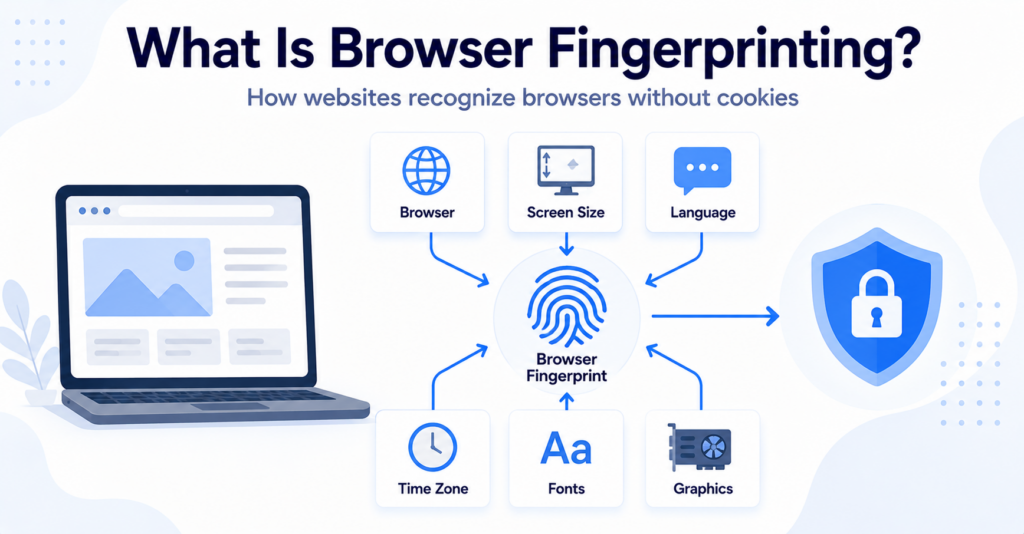
Browser fingerprinting is a technique that combines information about a visitor’s browser and device to create a recognisable profile.
Unlike traditional cookie-based tracking, fingerprinting does not always depend on saving a unique identifier in the browser. Instead, it may use details such as browser settings, screen size, language, operating system, and device capabilities.
In this guide, you’ll learn what browser fingerprinting is, how it works, what information it may use, and how it differs from cookies and other tracking technologies.
Browser fingerprinting combines browser and device characteristics to create a profile that may help recognise a visitor. It can work without a traditional tracking cookie, although the accuracy and stability of a fingerprint depend on which signals are collected and how they are combined.
What Is Browser Fingerprinting?
Browser fingerprinting is the process of collecting and combining information about a browser, operating system, device, and technical configuration.
Each individual detail may be common. However, combining several details can create a profile that is more distinctive.
For example, a website may observe a combination of:
- browser type and version;
- operating system;
- screen size and resolution;
- preferred language;
- time zone;
- available fonts;
- graphics capabilities;
- audio processing characteristics;
- browser settings and supported features.
The resulting profile is often called a browser fingerprint or device fingerprint.
A fingerprint does not necessarily reveal a visitor’s real name. However, it may help a service distinguish one browser from others or recognise similar activity during later visits.
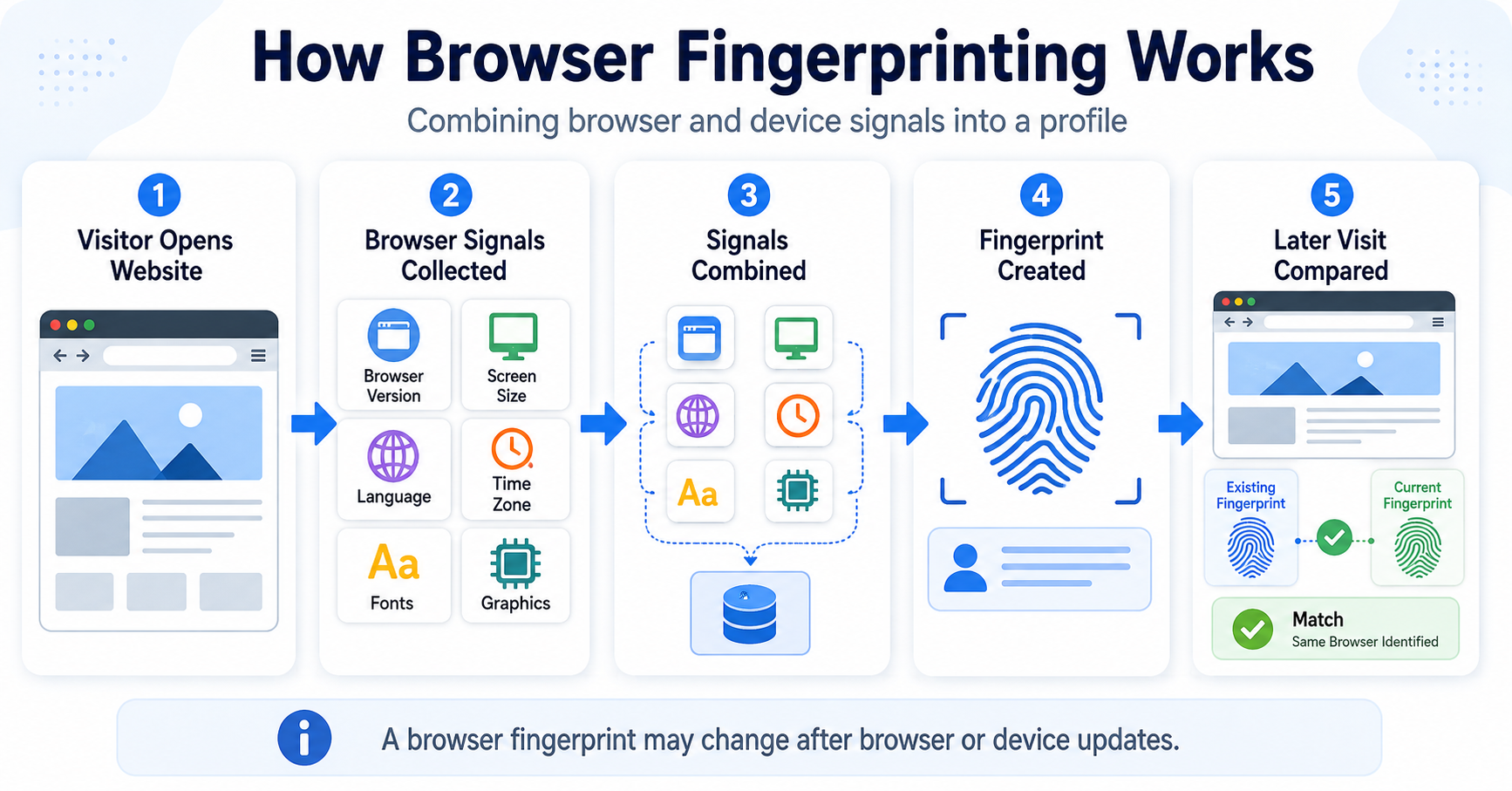
A visitor uses a particular browser version, screen resolution, language, time zone, and graphics configuration. A service combines these characteristics into a fingerprint that may help recognise the same browser during a later visit.
How Does Browser Fingerprinting Work?
Browser fingerprinting works by collecting several technical signals and combining them into a profile.
A simplified process looks like this:
- A visitor opens a website.
- The website or an external script checks available browser and device characteristics.
- The collected signals are combined.
- A fingerprint or similarity score is created.
- The service compares it with fingerprints recorded during other visits.
- The browser may be recognised as new, returning, or similar to an earlier browser.
Step 1: The website collects browser signals
Some information is normally included in web requests, while other information may be collected through browser features and website scripts.
The amount of information available depends on the browser, device, privacy settings, and methods used by the website.
Step 2: The signals are combined
A single characteristic such as screen resolution is usually shared by many visitors.
When screen resolution is combined with language, time zone, operating system, browser version, graphics output, and other characteristics, the result may become more distinctive.
Step 3: A fingerprint is created
The tracking system may convert the collected information into a technical identifier, profile, or similarity score.
Different providers may use different methods. There is no single universal browser fingerprinting system.
Step 4: Later visits are compared
When the browser returns, the service may collect the signals again and compare them with earlier results.
If the new fingerprint is sufficiently similar, the service may treat it as the same or a related browser.
A browser fingerprint is not always perfectly unique or permanent. Browser updates, device changes, privacy protections, and normal configuration changes can make a fingerprint less accurate over time.
What Information Can Browser Fingerprinting Use?
Fingerprinting systems may use several categories of information.
| Signal | What It May Show | Why It Can Matter |
|---|---|---|
| Browser information | Browser family, version, and supported features | Helps distinguish different browser configurations |
| Operating system | Platform and device environment | Adds another characteristic to the profile |
| Screen information | Resolution, dimensions, and colour depth | Can narrow the group of similar devices |
| Language and time zone | Regional browser preferences | Can add geographic or configuration context |
| Fonts | Fonts available to the browser or device | Different systems may have different font combinations |
| Graphics output | How the device renders visual content | Hardware and software differences may produce varying results |
| Audio output | How the system processes generated audio | Small processing differences may add another signal |
| Browser settings | Privacy preferences and enabled capabilities | Can make a browser configuration more distinctive |
Not every fingerprinting system collects every signal. A basic system may use only common request information, while a more advanced system may test several browser capabilities.
What Is Canvas Fingerprinting?
Canvas fingerprinting uses the browser’s graphics features to draw hidden text or shapes.
Different combinations of hardware, operating systems, fonts, graphics drivers, and browser settings may render the same content with small differences.
The system can analyse the result and use it as one part of a broader browser fingerprint.
The visitor does not normally see the test because it can happen in the background.
What Is Audio Fingerprinting?
Audio fingerprinting can use browser audio features to generate and process a sound signal.
Small differences in hardware, browser engines, operating systems, and audio processing may affect the result.
As with canvas fingerprinting, the result is normally used as one signal rather than as guaranteed proof of a particular person or device.
Browser Fingerprinting vs Cookies
Cookies and browser fingerprinting can both help recognise visitors, but they use different methods.
| Feature | Browser Fingerprinting | Cookies |
|---|---|---|
| Main method | Combines browser and device characteristics | Stores an identifier or other data in the browser |
| Requires a traditional stored identifier | Not always | Yes |
| Can the visitor delete it? | There may be no single stored item to delete | Cookies can normally be cleared |
| Stability | May change when browser or device characteristics change | Remains until expiry, deletion, or replacement |
| Common uses | Fraud prevention, security, analytics, or tracking | Sessions, preferences, consent, analytics, or advertising |
| Consent considerations | Depend on purpose, method, and applicable rules | Depend on purpose and applicable rules |
A cookie gives a browser stored information that can be read again. Fingerprinting attempts to recognise the browser by observing its characteristics.
The two methods can also be combined. A service may use a cookie as its primary identifier and fingerprinting as an additional security or recognition signal.
For a full introduction to cookies, read our guide explaining what web cookies are and how they work.
Browser Fingerprinting vs Local Storage
Local Storage saves data directly in the browser. Browser fingerprinting may work by collecting browser and device characteristics instead of relying on one stored identifier.
A Local Storage value can normally be found and removed through browser settings or developer tools. A fingerprint may be calculated again when the website loads.
However, a fingerprinting system may still use Local Storage, cookies, or other identifiers together with observed browser characteristics.
Learn more in our guide to cookies vs Local Storage.
Why Do Websites Use Browser Fingerprinting?
Browser fingerprinting is not used only for advertising. It can support several different purposes.
Fraud prevention
A financial service or online store may use device characteristics as one signal when checking for suspicious account access, payment activity, or repeated fraud attempts.
A fingerprint should not normally be treated as certain proof, but it may contribute to a wider risk assessment.
Account security
A service may notice that an account is being accessed from a browser configuration that differs from earlier visits.
This may trigger an additional security check or login verification step.
Advertising and tracking
Fingerprinting may be used to recognise browsers, build audience profiles, measure advertising activity, or connect visits when traditional identifiers are unavailable.
Analytics
Some analytics systems may use fingerprinting signals to estimate unique visitors, sessions, or returning browsers.
Preventing abuse
Websites may use browser and device signals to reduce automated sign-ups, repeated free-trial use, spam, or other misuse.
An online payment service sees an account login from a browser configuration that differs significantly from previous visits. It requests an additional security code before allowing the payment.
First-Party vs Third-Party Fingerprinting
First-party fingerprinting
First-party fingerprinting is performed for the website the visitor is directly using.
It may support fraud detection, security, account protection, analytics, or feature management.
Third-party fingerprinting
Third-party fingerprinting involves an external provider whose code or service is used across one or more websites.
Depending on its purpose and reach, this may allow the provider to connect browser activity across different websites or services.
The distinction does not automatically determine whether the practice is acceptable. Website owners should still review the purpose, data sharing, transparency, user expectations, and applicable rules.
Can Browser Fingerprinting Identify You?
A browser fingerprint can sometimes help distinguish one browser from many others, but it does not automatically reveal a person’s legal identity.
Its ability to recognise someone depends on factors including:
- how many signals are collected;
- how distinctive the browser configuration is;
- how stable the signals remain;
- whether the fingerprint is combined with account information;
- whether cookies or other identifiers are also available;
- how many visitors are being compared.
If a visitor logs into an account, a service may be able to associate the observed fingerprint with that account. Without such a connection, the fingerprint may identify only a browser or probable device rather than a named person.
Fingerprinting is generally based on probability and similarity. Two browsers may sometimes look alike, while the same browser may appear different after an update or configuration change.
Is Browser Fingerprinting Always Accurate?
No. Fingerprinting systems can produce false matches or fail to recognise the same browser later.
A fingerprint may change after:
- a browser update;
- an operating system update;
- a screen or monitor change;
- a language or time-zone change;
- new fonts being installed;
- privacy settings being changed;
- browser protections modifying exposed information;
- the visitor moving to another device.
For this reason, responsible systems may use fingerprints as one signal rather than as the only basis for an important decision.
Does Browser Fingerprinting Require Consent?
Consent requirements depend on how fingerprinting is performed, why it is used, what information is accessed, and which rules apply to the website and its visitors.
Fingerprinting used for optional advertising or cross-site tracking should not automatically be treated in the same way as a narrowly configured security feature.
Website owners should consider:
- the purpose of the fingerprinting;
- which browser or device information is accessed;
- whether personal data is created or processed;
- whether the fingerprint is shared with external providers;
- whether visitors are recognised across websites;
- whether an exemption applies;
- which regional privacy rules are relevant.
The UK Information Commissioner’s Office explains that storage and access rules can apply to device fingerprinting when the technique accesses information stored on a person’s device.
Read the ICO guidance on device fingerprinting.
Using fingerprinting instead of cookies does not automatically avoid privacy, transparency, or consent requirements. The actual purpose and technical behaviour must be reviewed.
Can a Cookie Banner Control Browser Fingerprinting?
A cookie banner does not automatically control fingerprinting simply because it appears on the website.
If optional fingerprinting is performed by a script or external service, the consent setup may need to prevent that technology from running until the relevant choice has been made.
A suitable setup may involve:
- blocking optional fingerprinting scripts before consent;
- activating advertising or analytics tags only after consent;
- sending consent choices to connected services;
- allowing visitors to withdraw consent;
- describing fingerprinting clearly in privacy information;
- reviewing whether security-related uses are properly limited.
Displaying a banner without connecting it to the relevant scripts does not provide meaningful technical control.
Our guide to cookie banner requirements explains the main consent and transparency principles website owners should review.
Can You Detect Browser Fingerprinting?
Detecting fingerprinting can be more difficult than finding a normal cookie.
A fingerprint may be calculated through scripts and browser features without leaving one obvious stored identifier.
Possible investigation methods include:
- reviewing website scripts;
- checking external requests in browser developer tools;
- examining which browser features scripts access;
- using privacy and tracker-detection tools;
- reviewing the documentation of installed services;
- comparing activity before and after consent.
However, an unusual script or request is not automatically proof of fingerprinting. The same browser features can also support legitimate website functions.
Can a Cookie Scanner Detect Fingerprinting?
Some advanced website scanners may identify scripts, external domains, or services associated with fingerprinting.
A basic cookie scanner may not detect the full process because fingerprinting does not always create a traditional cookie or Local Storage value.
Detection can also be difficult when fingerprinting:
- runs only after a specific interaction;
- is activated after consent;
- is performed through a first-party script;
- is combined with ordinary analytics code;
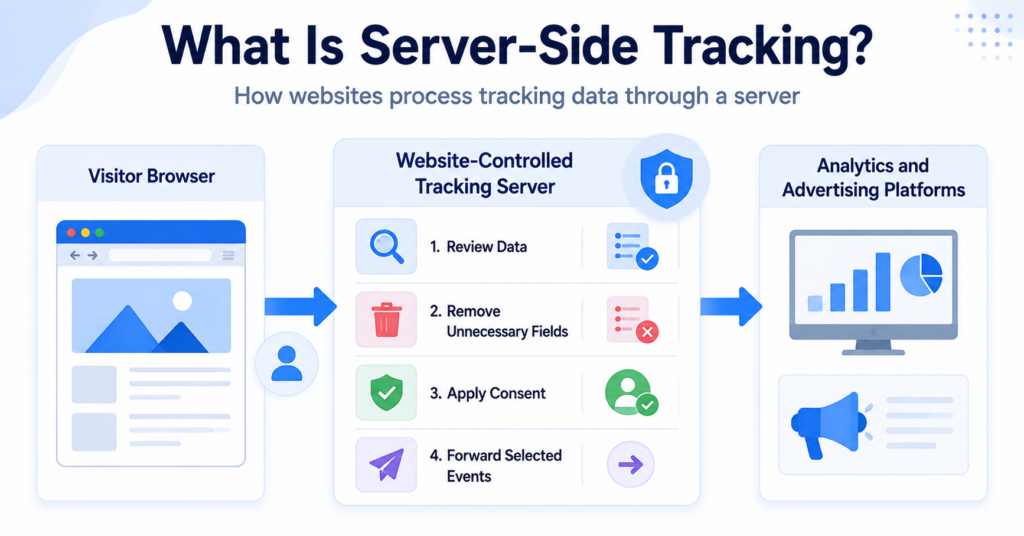
- uses server-side processing;
- appears only during login or payment activity.
Automated scanner results should therefore be treated as a starting point rather than a guaranteed complete analysis.
Read our guide explaining what a cookie scanner is to understand the role and limitations of automated checks.
Can You Reduce Browser Fingerprinting?
Visitors can reduce some fingerprinting signals, but completely preventing fingerprinting can be difficult.
Possible protections include:
- using a browser with fingerprinting protections;
- limiting unnecessary scripts and extensions;
- blocking known tracking services;
- restricting JavaScript where practical;
- using privacy-focused browser settings;
- keeping the browser updated;
- avoiding unnecessary account logins across unrelated services.
There is also a trade-off. Highly unusual privacy settings or extensions can sometimes make a browser configuration more distinctive rather than less distinctive.
For website owners, the best approach is to minimise unnecessary data collection and third-party scripts rather than relying only on visitors to protect themselves.
Common Misconceptions About Browser Fingerprinting
Fingerprinting always identifies a named person
No. It usually attempts to recognise or distinguish a browser or device. It may become connected to a named person when combined with account or customer information.
Every browser fingerprint is unique
No. Some browsers can share similar characteristics, and fingerprinting systems may produce both incorrect matches and missed matches.
Fingerprinting never stores information
Not necessarily. The fingerprint may be calculated from observed characteristics, but the service may still store the resulting profile or use cookies and Local Storage alongside it.
Clearing cookies prevents fingerprinting
Clearing cookies removes stored cookie data, but a fingerprinting script may calculate a new profile from the browser’s current characteristics.
Fingerprinting is used only for advertising
No. It may also support fraud prevention, account security, abuse prevention, and analytics.
Using fingerprinting avoids cookie rules
No. Privacy and device-access rules may apply depending on how the technique works and why it is used.
Next Step: Compare Cookies and Browser Fingerprinting
Cookies recognise browsers by storing information, while browser fingerprinting creates a profile from device and browser characteristics. The next step is comparing both methods directly so you can understand their technical and privacy differences.

Frequently Asked Questions
Common questions about this topic
Browser fingerprinting combines information about a browser and device to create a profile that may help distinguish or recognise that browser.
It does not always require cookies, but fingerprinting systems may use cookies or other identifiers alongside browser characteristics.
It may still attempt to recognise the browser by collecting its characteristics again. The result is not guaranteed to be accurate or unchanged.
The answer depends on the purpose, implementation, data collected, transparency, legal region, and whether consent or another requirement applies. Website owners should assess their specific setup.
Private browsing limits some stored data, but it does not necessarily prevent websites from observing browser and device characteristics during the session.
Yes. Similar browsers and devices may produce the same or similar characteristics, depending on the fingerprinting method.