Most websites use more cookies than their owners realise. A cookie scanner helps identify these cookies automatically before they become a compliance issue. Analytics tools, advertising platforms, embedded videos, contact forms, social media widgets, and plugins can all add cookies to a website.
A cookie scanner helps identify these cookies automatically. It scans your website, creates a list of detected cookies, and may organise them into categories such as necessary, functional, analytical, and marketing cookies.
In this guide, you will learn what a cookie scanner is, how cookie scanning works, what scanners can detect, and why regular scans are an important part of managing website cookies.
A cookie scanner is a tool that visits pages on your website and looks for cookies, tracking technologies, and third-party services. It helps website owners understand which cookies are being used and provides information that can be added to a cookie banner or cookie policy.
Want to see which cookies your website uses? Use our free cookie scanner to scan your website and identify cookies, scripts, and possible consent issues.
What Is a Cookie Scanner?
A cookie scanner is a website auditing tool designed to detect cookies and similar tracking technologies.
It works by visiting pages on your website in a similar way to a search engine crawler. During the scan, the tool checks which cookies are created, which scripts are loaded, and which third-party services are active.
The scanner may then create a report showing:
- The name of each detected cookie
- The cookie provider or domain
- The purpose of the cookie
- The cookie category
- How long the cookie remains active
- Which page or service created it
Many modern Consent Management Platforms include a built-in cookie scanner. The scan results can then be connected to the website’s cookie banner, preference centre, or cookie policy.
A cookie scanner can help you identify cookies, but you should still review the results. Cookies can be misclassified, missed, or added later when new plugins and services are installed.
How Does a Cookie Scanner Work?
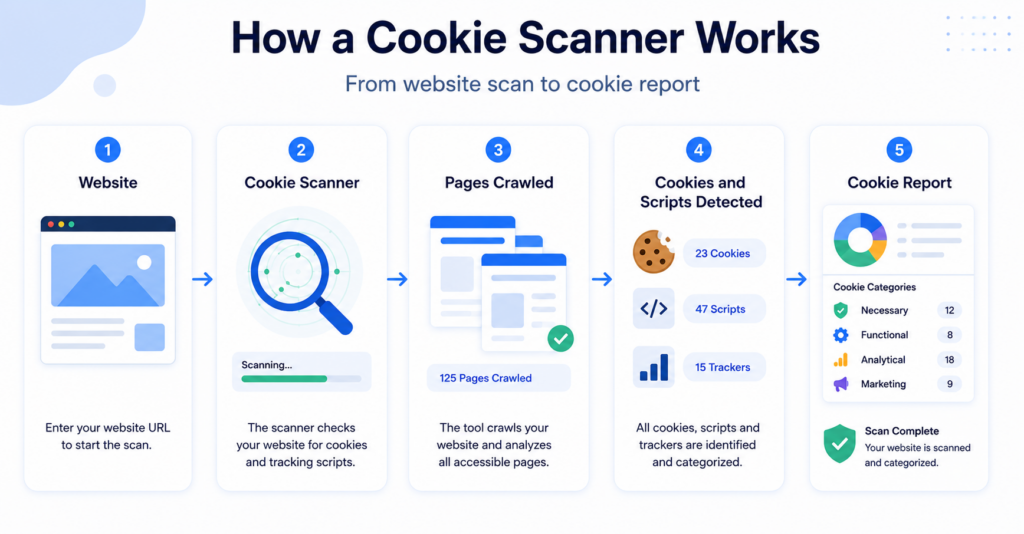
Most cookie scanners follow a similar process. You can try this process yourself with the CookieBannerGuide website cookie scanner.
1. You enter your website address
The scan usually starts when you enter your website URL into a cookie scanning tool or activate scanning inside your CMP.
2. The scanner visits your website
The scanner crawls the homepage and other accessible pages. Depending on the tool and plan, it may scan a limited number of pages or the entire website.
3. Cookies and scripts are detected
While visiting each page, the scanner records cookies, local storage items, tracking pixels, scripts, and third-party resources that may store or access information on a visitor’s device.
4. Cookies are classified
The detected cookies may be grouped into categories such as:
- Necessary cookies
- Functional cookies
- Preference cookies
- Analytical cookies
- Marketing cookies
You can learn more about these categories in our guide to the different types of cookies.
5. A cookie report is created
The scanner produces a report showing the cookies and services found during the scan. Some platforms also use this information to update the cookie declaration displayed on your website.
Enter your website address into our free website cookie scanner to check which cookies and scripts may be active on your pages.
6. Future scans detect changes
Automatic cookie scanners can repeat the process regularly. This helps detect new cookies that appear after you install a plugin, add a marketing tool, embed a video, or change your website theme.
What Does a Cookie Scanner Detect?
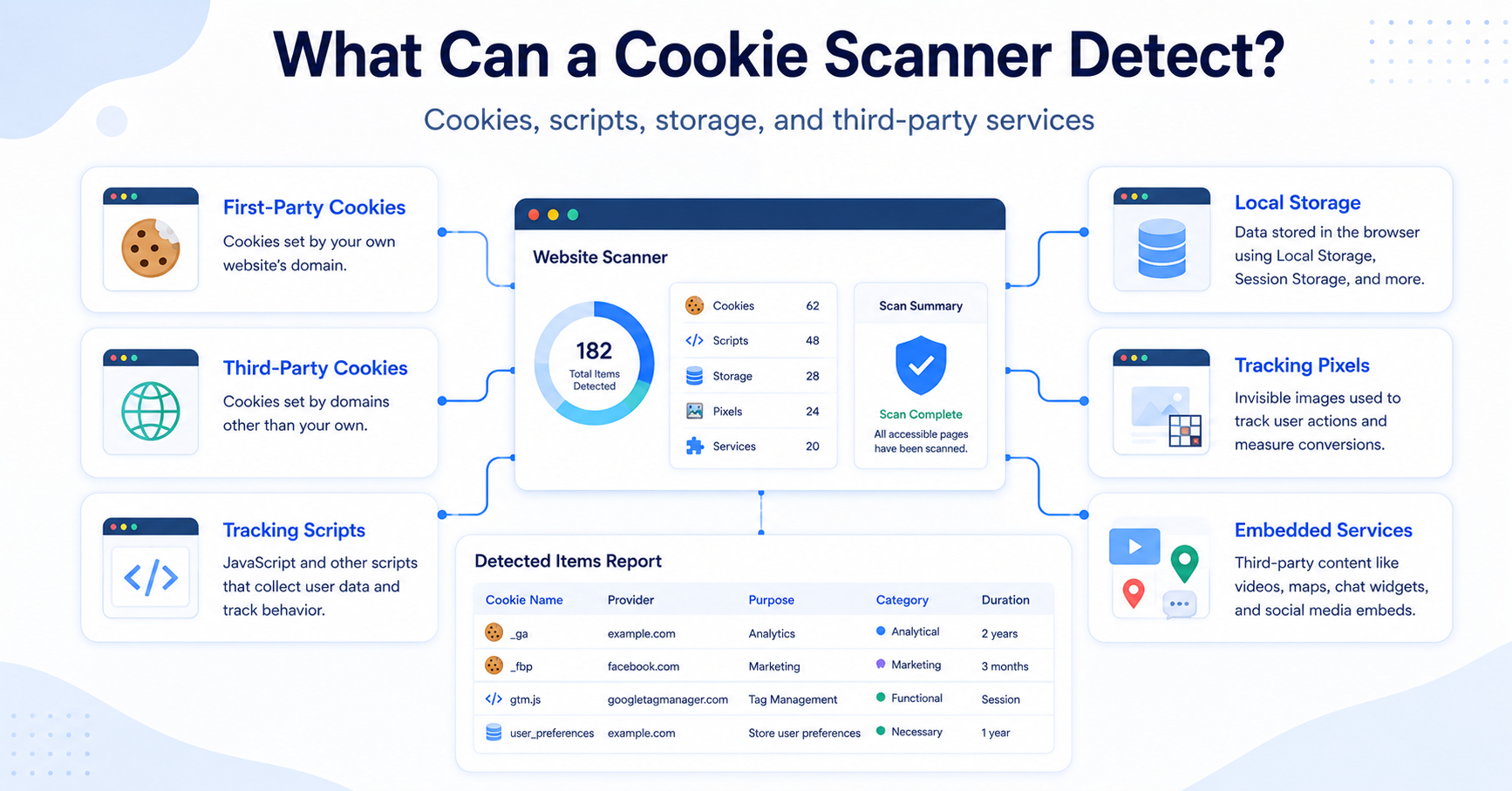
A cookie scanner may detect more than traditional browser cookies.
Depending on the tool, the scan may identify:
| Technology | What the scanner may detect |
|---|---|
| First-party cookies | Cookies created directly by your website or domain. |
| Third-party cookies | Cookies created by external services such as analytics, advertising, or embedded content providers. |
| Tracking scripts | Scripts from tools such as analytics platforms, advertising networks, and social media services. |
| Local storage | Information stored in the visitor’s browser outside traditional cookies. |
| Tracking pixels | Small tracking resources used for advertising, analytics, or email measurement. |
| Embedded services | Videos, maps, chat tools, payment widgets, and social media content. |
For example, a WordPress website may create cookies through its theme, security plugin, contact form, analytics plugin, embedded YouTube videos, and advertising tools.
Without scanning, the website owner may not know that all of these technologies are active.
Why Is Cookie Scanning Important?
Website cookies can change over time. Even if you created an accurate cookie list when the website was launched, that list may become outdated after new tools or plugins are added.
The UK Information Commissioner’s Office also recommends regularly reviewing the cookies and similar technologies used by an online service. You can read more in the ICO’s official cookie audit guidance.
Regular cookie scanning helps you:
- Understand which cookies your website uses
- Find third-party tracking services
- Update your cookie banner categories
- Create a more accurate cookie policy
- Detect cookies added by new plugins
- Identify unexpected tracking technologies
- Review whether non-essential cookies are blocked correctly
This information is especially useful when configuring a cookie banner. Visitors should receive clear information about the types of cookies used and be able to control non-essential categories where consent is required.
After completing a scan, review our guide to cookie banner requirements to understand what information and controls your banner may need.
Manual vs Automatic Cookie Scanning
Cookie scanning can be performed manually or automatically.
| Feature | Manual Scan | Automatic Scan |
|---|---|---|
| How it starts | You start the scan yourself. | The platform scans on a schedule. |
| Ongoing updates | Requires you to remember to scan again. | Can detect changes automatically. |
| Best for | Small or rarely updated websites. | Business websites, shops, and frequently updated websites. |
| Cookie declaration | May require manual updates. | May update the cookie list automatically. |
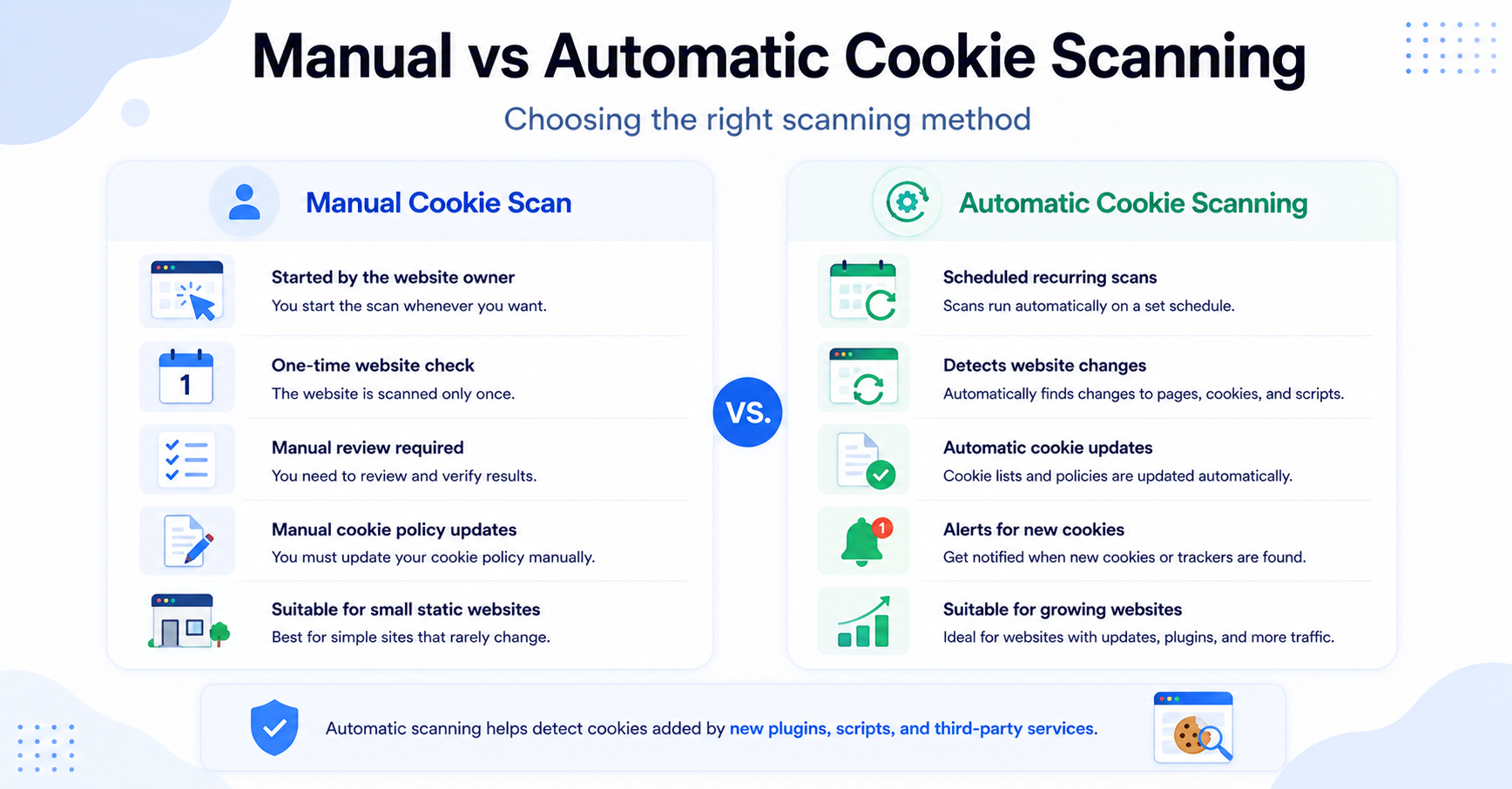
A manual scan may be enough for a very small static website. However, automatic scanning is more useful when a website frequently adds plugins, marketing campaigns, embedded content, or third-party services.
How Often Should You Scan Your Website?
There is no single scanning schedule that fits every website.
As a practical rule, you should scan your website:
- When the website is first configured
- After installing a new plugin or integration
- After adding analytics or advertising tools
- After changing the website theme
- After adding embedded videos, maps, or chat tools
- Whenever your cookie banner or policy is updated
Websites that change frequently may benefit from monthly scanning. Smaller websites with very few changes may scan less often, provided a new scan is completed whenever the technical setup changes. You can run a new check at any time using our cookie scanning tool.
You add a new live chat tool to your website. The service creates additional cookies that were not included in your previous cookie policy. A new scan can detect these cookies and help you update your consent setup.
Common Cookie Scanner Limitations
Cookie scanners are useful, but they are not perfect.
A scanner may miss cookies that:
- Only appear after a visitor clicks a button
- Are created after logging into an account
- Only appear during checkout
- Are loaded in specific countries or regions
- Are activated only after consent is granted
- Are created by scripts that load after a delay
- Appear only on pages the scanner cannot access
A scanner may also place a cookie in the wrong category. For example, an analytics cookie could be incorrectly classified as functional, or an unknown cookie may require manual review.
This is why scan results should not be accepted blindly. Check unknown cookies, review the services installed on your website, and confirm that the categories match their actual purposes.
Does a Cookie Scanner Block Cookies?
Not necessarily.
A basic cookie scanner only detects and reports cookies. It does not automatically prevent them from loading.
Cookie blocking is normally handled by a cookie consent tool or CMP. The platform uses the visitor’s consent choice to decide which scripts and cookies can run.
Some CMPs combine both functions:
- The scanner identifies the cookies.
- The CMP places them into categories.
- The cookie banner collects the visitor’s choices.
- The CMP blocks or allows scripts based on those choices.
This is one reason why a cookie scanner is often included as part of a larger Consent Management Platform rather than offered as a completely separate tool.
Does a Cookie Scanner Create a Cookie Policy?
Some cookie scanners can generate a cookie declaration or help populate a cookie policy.
The generated list may include cookie names, providers, purposes, categories, and expiration periods. However, you may still need to add information about your website, data processing practices, and how visitors can change their preferences.
For a complete overview, read our guide on how to create a cookie policy.
Does a Cookie Scanner Make a Website GDPR Compliant?
No. A cookie scanner alone does not make a website GDPR compliant.
It is primarily a discovery and auditing tool. It helps you understand which technologies are active, but it does not automatically solve every consent or privacy requirement.
A complete setup may also require:
- A properly configured cookie banner
- Clear Accept and Reject options
- Prior blocking of non-essential cookies where required
- A cookie policy and privacy policy
- A way for visitors to change or withdraw consent
- Consent records
- Correct configuration of analytics and advertising tools
If you use Google Analytics or Google Ads, you may also need to understand how Google Consent Mode works with your consent platform.
A cookie scan is an important technical check, but it is only one part of website privacy compliance. CookieBannerGuide provides general educational information and not legal advice.
How to Choose a Cookie Scanner
When comparing cookie scanning tools, consider more than whether the tool can perform a basic scan.
Look for features such as:
- Automatic scheduled scans
- Support for multiple pages or domains
- Cookie categorisation
- Detection of third-party scripts
- Automatic cookie declaration updates
- Integration with a cookie banner
- Consent records and preference management
- Google Consent Mode support
For most website owners, choosing a complete CMP with scanning included is more practical than using a separate scanner and manually connecting the results to a cookie banner.
Final Thoughts
A cookie scanner helps you discover which cookies, scripts, and tracking technologies are active on your website.
It can make it easier to organise cookies into categories, update your cookie policy, and configure your consent banner. Automatic scanning is especially valuable because website cookies can change whenever you add a plugin, integration, or third-party service.
However, scanners can miss certain technologies or classify them incorrectly. Always review scan results and test your website’s consent setup before relying on the report.
Next Step: Scan Your Website for Cookies
Before choosing or configuring a cookie consent tool, scan your website to see which cookies, scripts, and third-party services are currently active.
If you have never scanned your website before, now is a good time to start. Even small websites often discover cookies they were unaware of. Running a scan only takes a few moments and provides a clearer picture of your website’s cookie usage.
Frequently Asked Questions
Common questions about this topic
A website cookie scanner is a tool that crawls website pages and identifies cookies, scripts, and other tracking technologies that may store or access information in a visitor’s browser.
Some platforms offer free cookie scans with limits on the number of pages or scans. Automatic recurring scans, multiple domains, and advanced consent features are often included in paid plans.
No. A scanner may miss cookies that appear only after login, interaction, consent, checkout, or location-specific actions. Manual testing may still be required.
No. A scanner normally identifies and reports cookies. Removing a cookie requires changing or removing the plugin, script, service, or website feature that creates it.
A scanner alone usually does not block tracking. Cookie blocking is normally provided by a cookie banner or Consent Management Platform that controls scripts based on visitor consent.
Run a new scan whenever you add or change plugins, analytics tools, advertising services, embedded content, or other third-party integrations. Frequently updated websites may also benefit from scheduled monthly scans.